 18:01
Pioneer DDJ-RB Simple Beginner Tutorial with Recordbox Underground Tunes February 2018 CD Pool
Contents of the video
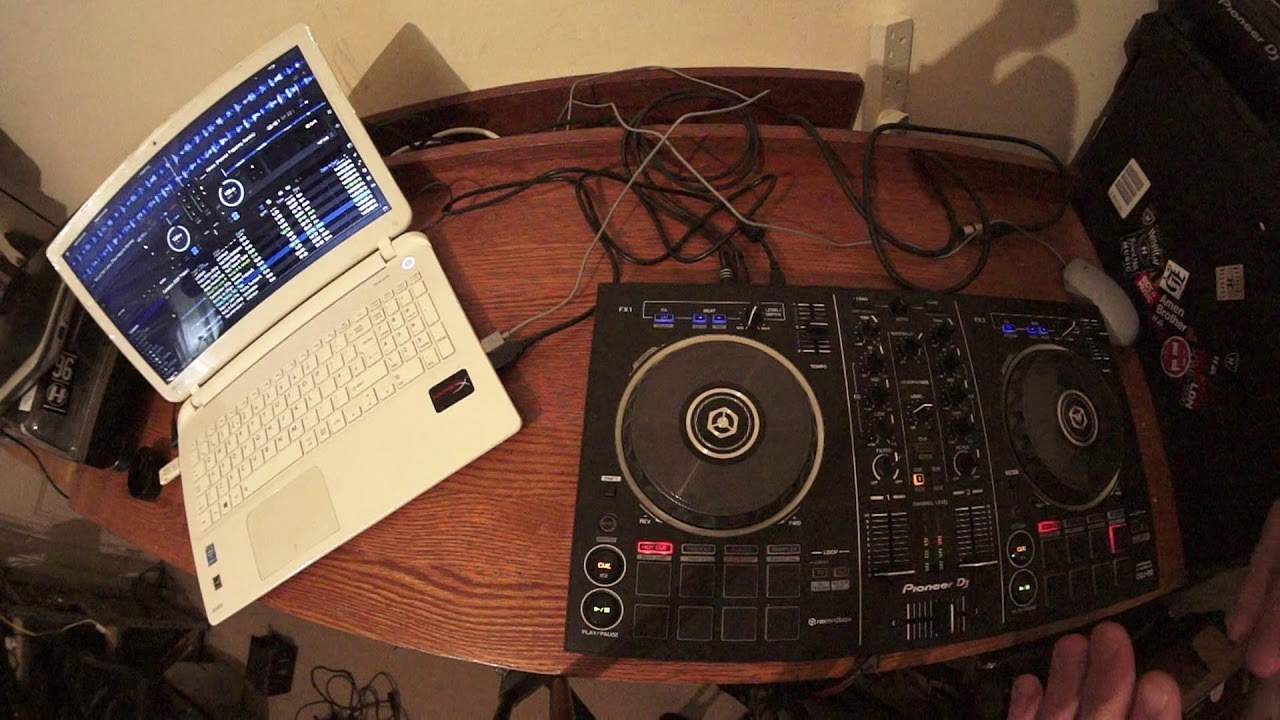
0:00 In this video we're looking at the DDJ-RB from Pioneer
Alright, in this video we're looking at the DDJ-RB from Pioneer. We've also got the rekordbox software on the laptop and I'm using a bunch of tunes from CDPool, it's the underground releases for February 2018. This video is targeted really for the new DJ and also for people who don't really know not so much what a controller is but maybe you've got a controller and you've got the software and you're just not happy, there's something wrong. So hopefully I may be able to, let's say, make those wrong things right. Now first of all, let's have a listen to this track. So what I'm going to do, I'm going to press play or actually I'm going to press cue. So while I press cue what will happen is of course the track will play but it will only play while I've got my finger on cue.
Now what I want you to listen for, okay this is really important, is the time difference between me hitting cue so you can hear me there and the track playing. Let's have a listen to the other side. Now can you hear? There is a slight difference in time between me pressing cue and the track starting. Now that's because... Not every single file, but sometimes what you'll get is you'll get a file that will... And this could be from anywhere. This could be from iTunes, from Beatport, from God knows where. You get a file that will not start on the one. That's because the software is recognising the beginning of the actual file itself and that might not be the beginning of the track. So that is very important.
2:33 I'm going to press play
So for example, let's imagine you're doing a mix so let's just press play here. This track is Mood For Love by Paul Najera. Sorry it's the Paul Najera remix. And again all of the tracks I play now can be found on the CDPool website. There will be a link in the description right down there where you can get more info on the tracks I'm playing as well as all of the other tracks from February Underground. So let's have a listen now. If I press play on the one... 3, 4, 1, 2, 3, 4, 1 Okay you could hear that was a complete train wreck because they're both different BPM and also when I pressed play on the one... 1, 2, 3 The track itself was not coming in on the one so we need to rectify that. How can we do it?
Alright, I'm going to press play. Put my hand now on... the virtual turntable on the RB and move it back. Can you hear now? I'm actually now in control of the sound so I'm going to bring it back and what I'm doing now is I'm aligning this line that's in the software with the first kick of the track. Now with my hand on the RB holding that in place, I'm going to press Q. Alright, now have a listen. 3, 4, 1, 2, 3, 4, 1 Now I've queued up the first kick. Let's do exactly the same thing on the other side. Press play...
There. I'm going to press Q. Now have a listen.
4:46 What I'm going to do now is press play on the Woke track
Okay, so what I'm going to do... I'm just going to change that icon there. Okay, so what I'm going to do now is I'm going to look at the virtual turntables and let's have a look. If I put that in the centre, the mood for love is 1 to 525 BPM. Put that in the centre. And the Woke Patrick topping remix on the right hand side is at 126 BPM. Now let's try and do a mix keeping everything like that. So let's press play on the mood for love track. In fact, what I'm going to do... I'm going to use my mouse and highlight over the wave format underneath the wording on the software and just go to a middle point. Click down. There. Okay, so what I'm going to do now is press play on the Woke track. Okay, not only was that out of time, out of phrase, but it just sounded terrible.
That's because we've got different BPM. One is slightly faster than the other. So what we need to do... We can do one of three things. I can either slow down the Woke track to 125, number 1. Number 2, I can speed up the mood for love. Speed up the mood for love to 126, number 2. Alternatively, if I want to, I can slow the one down and speed the one up a little bit so I could reduce the speed of the mood for love to say 125.5 and slow the Woke down to 125.5. So what I'm going to do is... Let's have a look. Let's speed this one up actually. Let's speed the mood for love up to 126. Now, I now have my finger on the pitch and I am looking at the virtual circle in the software and I'm getting to 126. There we go. Now it's quite difficult to do this to get it exact
7:10 Bring it back in beat
And I will explain about this very soon. So it's around about 126. I've just about got it to 125.98. Which is pretty damn close. Alright, so I'm going to repeat the process now. Press play on the mood for love. Let's go to the middle point again or let's go back some there. Now at the moment as well, I'm not going to use any headphones. I've got both volumes up. Press play with Woke on the one. Now we can hear. That's much more pleasing to the ear. That's starting to go off beat slightly. All I did there was I used the side of the jog wheel and moved that anti-clockwise. Bring it back in beat. Moving it clockwise a bit now. Now this is where experimentation is great. Okay, because by moving the side of the jog wheel on one of the turntables
Will either make it go slightly more offbeat or put it back in time. So again, this is a million and one tutorials in itself. But it's not what I want to cover today. So let's have a listen to Woke. This is Patrick Topping Remix. Now I'm going to put the camera a little bit closer to these laptops. And in the centre of each of these virtual turntables we've got a few numbers. We've got our BPM. We've got the percentage that we're increasing and decreasing the speed. And also what we've got is we have got a plus and a minus and a number next to that. Now at the moment we've got a plus and a minus six. Now I highly recommend and I can't express this enough if you do have the likes of an RB or a controller with a small pitch control
Keep that number as low as possible. Plus or minus six or eight is fine. Anything above that and especially for a new DJ you're going to find it not impossible but very difficult to form some kind of beat mix. So what is plus or minus six? Well let's imagine I'm just going to pause that or queue it up, sorry. Let's imagine we've got a track at 100 BPM. If we are at plus or minus six and I move the pitch all the way from me as far as it will go to the minus position I will now have reduced the track by six percent so it will go down to 94 BPM. On the other hand bring it all the way towards me I'll increase it to 106 BPM which means that the space from zero to minus you can reduce it by six zero to plus you can increase by six.
So let's imagine think about it if you're at 16 or wide then you've got less control because from zero to plus it will go up to 116 BPM minus it will go to 84 BPM. Now I'm going to demonstrate that by let's grab another track let's drag Body and Soul and this one here is Body and Soul, the original mix
10:28 Master tempo, tempo engaged, position
OK what I'm going to do now is I'm going to take the mouse and click on the icon with tempo range once to take it to 10 twice 16 and a third time to wide now I'm now going to start to move the pitch away from me. Once I've moved the pitch all the way to the minus position I have stopped the track because of course if we have our hypothetical track of 100 BPM you move it away from you it's going to stop because you're reducing the speed by 100% so 100 from 100 is bugger all on the other hand if you bring it towards me it's going to double in this case 124 is 248 and that's what it says there 248 BPM alright so there is a good side to the wide feature is it's great for effects so have a listen
Now also we can start a mix so let's just cue the track up again so have a listen from the beginning listen imagine this is the beginning of your set what I'm doing is I'm slowly with the pitch on the controller bringing it towards the zero position the centre bang there you go now that's with something called master tempo engaged master tempo while that's engaged will keep the key of the track and you can find master tempo on the rekordbox software to the right hand side bottom right around about the sort of five half past four position on the software by the virtual turntable now with master tempo engaged when MT is engaged that will be highlighted in red when it's disengaged it's clear now what happens is something very wacky
Completely different and this sounds intense exceedingly just strange really here we go I'm gonna put the pitch to close to the minus position so it's probably going to be like pretty slow it's at 18 nearly 19 bpm which is very slow have a listen this is going to sound better with a bit of melody going on have a listen so not only is the track speeding up the melody is rising and speeding as well
14:25 Communism it's the original mix again
Something like that I'll leave you working out with your own imagination but it's a great idea for the end of set okay so to engage master tempo again I'm gonna highlight the MT with my mouse click on it now that's red I'm also now going to highlight with my mouse on the wide icon click that one more time and we're back to the safe zone which is plus and minus six all right so let's have a little bit more of a listen to body and soul higher state of consciousness kind of sound I don't know why but
I don't know why but it's it's okay next one is communism it's the original mix again the underground releases they're very sort of twisty and bendy and experimental and you know they're the sort of tunes for someone who doesn't want to listen to fluffy kind of commercial music you know if you're the sort of dj of the room a whole bunch of pot and weed smoke floating around everywhere and everyone's got a big smile on their face then these are the tunes for you let's have a look let's lay back watch you okay bring that one down watch you this is the original mix from camarena you see again with the underground series you know the hand trappy oh my goodness me we're on top 40 no this is um this is your club stuff big time let's have a look at the rb the best effects
Of all time it's the filter a lot of times with dj it's about you being in your room or by yourself somewhere and experimenting making mistakes understanding you've made and then of course rectifying them in the future so have a go with the filter have a listen now one two three four one two three four one two three four okay so what i'm doing there i'm using the filter in time with the phrasing of the track not just you use an effect in time again let's let's show you filter in time with the track have a listen okay all right now i hope that's been a help don't forget check out the link in the description to cdpool.com these are the underground releases february 2018 thank you very much practice and enjoy
This transcript was produced automatically from the audio of the video and may contain mistakes.
Related videos
-
Complete Beginner DJ Lessons Tags Key BPM Etc
A more advanced lesson folded in early, and worth doing once rather than putting off, because everything it sets up gets used for years…
-
Complete Beginner DJ Mixing Lessons Video 19 Getting Your Kit Ready for an Easy Mix
A whole lesson on getting ready, which is the right call - the exercise in the next video only teaches anything if the two decks are…











