 6:17
PIONEER DJM-5000. Zone Feature explained!
Contents of the video
0:01 Cocktail party
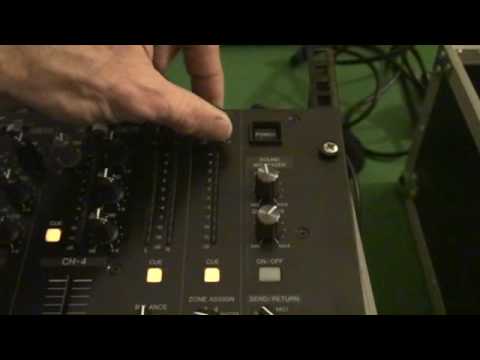
Alright folks, now in my usual punk style I'm going to give you a bit of info on a mixer. It's from Pioneer, it's known as the DJM5000. Now this particular mixer has got a zone feature. I have done one video on it already but some people can't understand the concept. So, right here we go. I'd like to show you a cocktail party. Ellaskins, The DJ Tutor The DJ Tutor is available for purchase at Ellaskins.com The blue cable is for master. Now let's say hypothetically, okay, I was going left and right master. Out of here, I would go left and right into this one amplifier, blurred, and then I'd go left and right out into not one but two speakers. Exactly the same for zone. I would go left and right zone, out, into another amplifier,
2:34 Let's play Sebastian T-Burn
And then out of that amplifier into another two separate speakers. Now that's the only difference, the only reason I'm using one amp is to save me having four cables, four speakers. So I hope you understand the logic there. Okay, so the tracks I'm using is my brother-in-law which is Sebastian T-Burn on this guy here. And on this one here I'm using a track by Jeremy Sylvester and I will put links in the description. To both of them. Now first of all what we're going to do, I'm just going to cue that up. Let's play Sebastian T-Burn. I know you can hear but that is actually playing here. What I'm going to do now, I'm going to turn that down. Alright? I'm going to go over to my zone. Here it is. Zone on, zone assign and level for zone.
4:00 To the main room
I want you to listen in the background because very soon we'll hear something through there, in our cocktail area. I'm going to put zone on, make sure we're on channel 1, because we're on channel 1 here, and I'm going to slowly start to increase zone. Listen. Can you hear? In here, there's nothing at all, no sound. Let's go into our cocktail bar. Are you happy with the music? He's pissed. OK. Right, let's go back in. To the main room. Now bearing in mind this is the main room and the main room do not want to hear the cocktail music. They want to hear this guy here. So what am I going to do? Press play. So the main room is listening to this track, cocktail is listening to that. Alright now I hope you get the idea. Okay so in other words now I can have one track
In the cocktail bar, so we could have background or anything. And at the same time, I can be playing this guy here in the main room, alright? If I want to, all I need to do... Sorry, wrong one, beg your pardon. That one, that was the master volume, sorry. Turn that zone down, like so. It is very difficult when you're holding the camera as well. Zone off. And now, we've got this in the main room. And if we want to, this one. But what happens if we want this one in the cocktail bar and we want this one in the main room? Very simple. Go over here, zone assign, channel 2, zone on, turn this up, listen. Now we've got that track in our cocktail area. And we go back through here, that's Jeremy Sylvester, and let's say we want Sebastian T-Bone playing...
In the main room, where he should be playing. This video is dedicated to Sebastian T-Bone. A little insight and hopefully just slightly better explained where the zone feature is concerned on the DJM5000. Practice and enjoy. Thank you very much.
This transcript was produced automatically from the audio of the video and may contain mistakes.











