 6:24
PIONEER DJM-700 Using the Roll feature in half time.
Contents of the video
0:00 This player
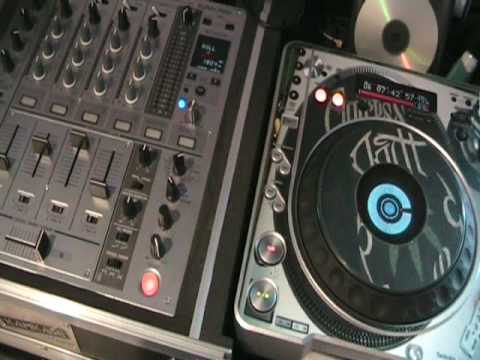
Alright folks, another video on the DJM700 mixer and one of the effects known as Roll. The effects dial is this guy here. Right, let's just have a look at this player here. First of all, I want to play the music so you can get a general idea of what it sounds like when the pitch control is in the centre position. OK, let's have a listen. By the way, if you like the track, follow any relevant links or any information in the description and you'll be sorted. Here we go.
1:42 Channel, roll, press
Okay, in this video what I'm going to do, I'm going to use the roll feature but in half time. I'm actually going to reduce this track by half. When I say reduce, I mean reduce the BPM, the beats per minute. If we look here, the BPM, beats per minute is 126. 126 beats in every single minute. Now, I want to reduce that by half. How do I do it? Well, we've got this guy here, tempo. Part of the pitch control will reduce the music by 100%. So 1-2-6, half of 1-2-6 is 63. 63 and 63 is 126. So what I need to do also is press the master tempo so I can keep the same key, the same sound of the track. So let's press play and I'm going to start to reduce the speed to 63. Okay, let's have a quick close up. 63. Now bearing in mind all of this can be done on the fly with your headphones on, but again it's about practice. Now what I've done, I've got the crossfade set so I've got channel A there, channel B that side. Okay, what I need to do now is I'm going to set level depth to maximum. I'm going to set this guy here to number 3 because that is
The channel we're going to take the roll from, and then I've got this here set to roll. We need to notice at the top, centre point is 1 over 1, next one along is 2 over 1. I'm going to have it set to 4 over 1. Press Q again. Let me just zoom out a little bit. I can't, right, OK. I'll leave it like that. Right, what I'm going to do now is press play and I'm going to hit that button on the count of one in a bar. Of course, a bar is 1, 2, 3, 4, 1, 2, 3, 4. OK, so let's play the music and like I said, as soon as I get to the count of one, I'm going to hit that button there. 2, 3, 4, 1, 3, 1. Now I've got a roll. What I need to do now is transfer that roll... I can do that by just now moving this guy here that used to be at 3 over to 2. Now let's have a listen. I need to keep this on, press Q and I've still got the music because I've taken a sample, rolled, transferred it, it's now on that channel. I can put that roll onto any channel I want to but for this demonstration we're going to have it on number 2.
3:52 Take it off master tempo
Now what's happened is that is now at half speed, so I need to go back to the player and come back up to 1-2-6. Take it off master tempo. Right, now without...I haven't got any headphones, so the beat could slightly go off, so what you have to bear in mind here is that you would have headphones on, you may need to keep your finger on the pitch just to keep it in right time. The camera over to sort of that position. Let's just put it up slightly. Right now, this is where we can have a bit of fun. Okay, what I'm going to do now is put the volume up, not slightly, but hopefully you'll get the general idea. So, what did I do? I had the original track playing, reduced the speed, got it at half tempo, then I used the roll feature, I sampled that, put it over to another channel, this particular track back to its original speed,
And then I incorporated the two tracks and because one was half time and the other one was the original time, I was able to match the beats. And again like I said, maybe you need some, well you will need headphones just to keep it in time. It does go off or it possibly will go off very slightly. But of course using the crossfade going from one to the other, you can have some damn good fun. Practice and enjoy. Thank you.
This transcript was produced automatically from the audio of the video and may contain mistakes.










