 3:42
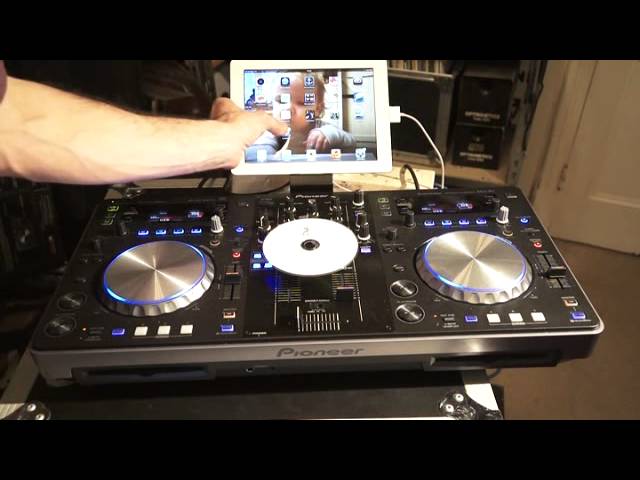
Pioneer XDJ-R1 Set up to iPad and using a CD by ellaskins the DJ Tutor
Contents of the video
0:00 This is a video on the Pioneer XDJ-R1
Alright ladies and gentlemen, this is a video on the Pioneer XDJ-R1. Also, the setup time. Now I'm going to be talking through what I'm doing so it's probably going to be a little bit quicker than this. We're going to turn the R1 on, we're going to then connect it wirelessly to the likes of an iPad. We're going to load a track from the iPad and also then, we're going to then let's say go from a track from the iPad and change over to a track on a CD. So first of all, we need to turn it on and it should light up. What I'm going to do as well, I'm going to go to settings on my iPad, go to Wi-Fi and what I need to look for is... If we have a look here, we should have something there. So that can come up now. We've got combo MIDI, now that is for the XDJ-R1.
1:06 Free app which is RemoteBox
So that is talking now to the XDJ-R1 but what we need to do, what I need to do now, is to go to the free app which is RemoteBox and get that now to talk to the R1. So the program has to talk to the R1. So the program has to talk with the hardware, vice versa. And I don't know if you can see that now, we have the WLAN light shining. Now that is telling me that there's a connection going on there. Okay, so what we need to do now is we need to of course find some files. Now you can see, I don't know if you can see there but it says no USB. So what I'm going to do now is put this USB stick in. By the way these files are... I have not gone through Rekordbox. And ideally if you can use the Pioneer Rekordbox which is from the Pioneer website, it's software that is free and it will make your music come to life.
2:54 Very apparent
Right, alert XDJ-R1 library cannot be found. We recommend creating the library with Rekordbox. Free download at pioneerdj.com Press OK. Right, can't see anything there because I need to go to folder. And these are all my folders. So there's loads and loads of them. And we'll go to Soca. And we'll click on that, we'll load. Press the icon correctly. And that is pretty much it. And there you go. So that now is playing a track. Now let's imagine now we want a CD in the other side. And again this hopefully will put people at ease. So we're now using the software, the remote box on the left hand side. And now I'm going to put a CD in on the right hand side. I'm going to press CD. That's loading up. There you go. Now I've gone to CD.
So first thing is very apparent here. When you're using the software it doesn't mean to say that both sides have to use the software. You can software one side, CD the other side. Alright? That's been a help. Any more comments or anything like that, you know, bung them underneath. If you've got any questions should I say. There will be more videos to come on the Pioneer XDJ-R1. Practice and enjoy. Thank you.
This transcript was produced automatically from the audio of the video and may contain mistakes.











