 9:11
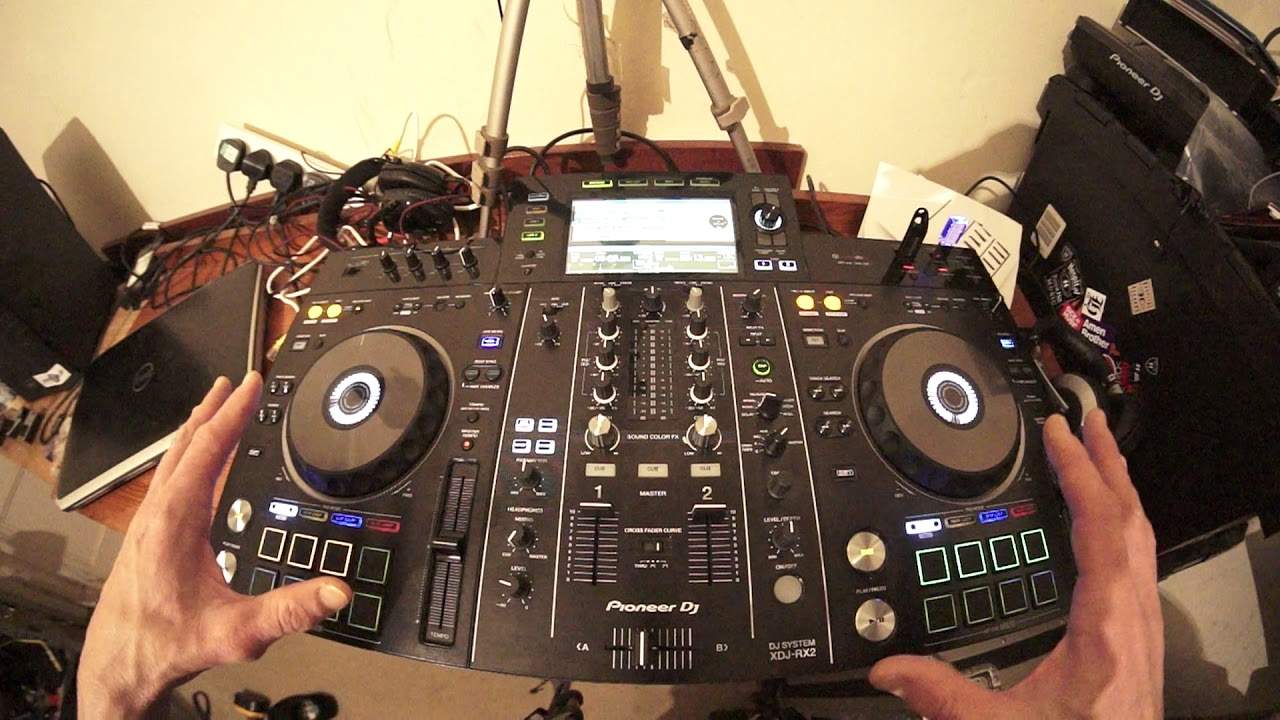
Pioneer XDJ-RX2 DJ Lesson Adding Loops to Acapellas
Contents of the video
0:00 I'm using the DJ system from Pioneer known as the XDJ-RX2
Alright, in this video it's a simple demonstration on using some loops, some hot cues and pretty much doing a remix on the fly. I'm using the DJ system from Pioneer known as the XDJ-RX2. I have on the right hand side Louetta Holloway, a track entitled Love Sensation. Hopefully this video is not going to get blocked, I'm just going to use little bits of it but it's the acapella version. Now, if you're not familiar with acapellas, let's imagine you're hearing one of your favourite songs and you've got some artist singing or rapping over the top of the track so you have beat, bassline, melody, vocals, the whole lot. Well, let's imagine you can take away the beat, the bassline and the melody and you're just left with the
Vocals. That is an acapella. Have a listen. There you go, it gives you an idea. OK, now on the left hand side I've got a track and for this demonstration, now I can do eight if I want to but all I've done is set three loops. And I've done that by forming a loop using the in and out and then with the hot cue button engaged as soon as I've made that loop I've set that into a hot cue. So just to give you a quick example let's skip the track forward a bit. So in, two, three, four. Out, two, three, four. There's my loop. Press another hot cue that is not highlighted in any colour. That is now amber and now I have recorded another hot cue. I'm just going to get rid of that one for this demonstration so I'm going to press shift which is on either side of the RX. On the side if you look at the
Turntable. For the partially sighted it is at around about eight o'clock. So with my finger, one of my fingers on the shift button I'm now going to press that last pad and now that's no longer highlighted in amber which means that that loop has been taken away. All right deleted there no more so I've just got three left. Very quickly as well if you want to using the hot cues if you just want to set a hot cue then of course you can do that press the hot cue buttons and now that's in green. So again just to clarify green is a hot cue amber is a loop that you've recorded and like I said earlier you can record eight of them this is an amazing piece of kit this is not a toy no way. You should be quite happy using
3:02 On the right hand side I have got a few more hot cues
This in a bedroom or in front of a thousand people but again it's down to the user. It's not about the kit if you're a professional person you should be able to use anything. Right so on the right hand side I have got a few more hot cues. Now these are hot cues and again what sorry very quickly one of them is not on the one oh sorry let's turn the volume up again I don't want to go too in depth this is slightly more this is a beginner sort of two immediate intermediate lesson using a hot cue that's slightly offbeat it's
Because you've got to remember the time signature that you set the hot cue on. Okay so now this is a bit bland really now what we can do is we can add some effects I've got an echo there listen now did you notice that what I was doing is as soon as I hit the hot cue I was pressing the play pause what that will do is it will pause or should I say stop that so of course what's happening is you're allowed now to edit it will let you edit a little bit of the hot cue which means you don't have to let it play all the way through and also because we've got an echo on that it's giving us a nice little finish a rounded finish to that hot cue without it finishing abruptly for example like this add the echo okay makes
Sense right. So right now let's imagine we want to do something that's in the mix okay so you know you're in a position where you want to be able to get these two kind of tracks ready but at the same time you don't want the audience waiting because you know this is just a two channel mixer so how can we let's say get these two tracks ready without people waiting. So of course we have a third input we have
External CD player that's to the left or the right of you doesn't really matter you have an input at the back and you can see the readout the BPM for example on the right hand side you have a track playing all right so this is your track playing on the right hand side external CD player you're looking at the BPM and you have a good idea of the track you're going to be bringing in on the auxiliary input because the trouble is with this you don't have a headphone input. You're not able to monitor it. Unless of course this is the biggie unless the external CD player you are using has a headphone in. If it does and quite a few of the CDJs out there the CD players I beg your pardon do have headphone in just check out I think Reloop do some American DJ do as well and possibly
6:10 But what I haven't
Some Denon so what you can do of course you can put your headphones in you can listen to that player make sure it's in time. Once it's in time slowly bring the volume up on your auxiliary in and then of course you have that playing which gives you then the opportunity to get this kind of setup ready and then of course all you've got to do is start mixing in one of your loops. Okay so you get the general idea now again what I haven't done I have planned this tutorial knowing what I want to demonstrate but what I haven't done is planned the demonstration. So that is the important part really about this video I haven't taken the time to make this amazing kind of mix between my hot cues and my sorry loops on the left hand side and
My hot cues on the right. This video is about showing you what you can do and also it's about opening your mind and looking at the kit you have in front of you don't look at it and go two channels that's all I can do. Look at whatever kit you've got and go. It's not just two channels I can maybe do this add this add that. There is so much more to the kits you have a lot of companies they design and build something and they understand what they've done but when they chuck it out there when they give it to the public there are people out there who go well you know I can add this or do this or do that and that is the genius all right you are the genius get out there move your ass and go and do shit all right.
I hope this has been a help hope it's inspired you a little bit practice and enjoy thank you.
This transcript was produced automatically from the audio of the video and may contain mistakes.










