 9:39
Quantize a Loop or Not and Cue Loop Call Demonstration
Contents of the video
0:01 You're listening to a tune entitled Fire featuring Shirley Lights by M
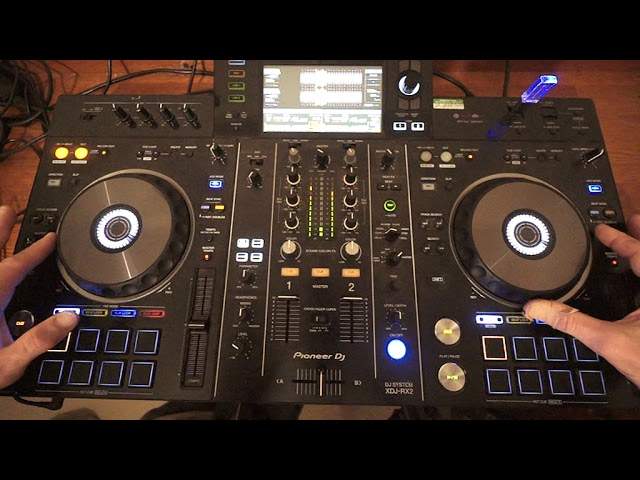
Alright, you're listening to a tune entitled Fire featuring Shirley Lights by Mr. Lenny Fontana. This is the Saturday Night Disco Club mix. There will be info on this track in the description. Loads of different mixes, we're just using the Saturday Night Disco Club mix for this video. Now, what I'm going to do is I'm going to form a loop, a one bar loop, using quantize on the left side and then disengage quantize and form a loop on the right side. The piece of kit I'm using is the Pioneer XDJ-RX2 and the objective here is to see what it's like with quantize engaged and with quantize disengaged. So, I'm going to go to the beginning of the track, just, we're right at the beginning.
Okay, so I'm going to set quantize on the... left, or I'm going to set quantize up, sorry, beg your pardon. That button can be found on the left hand side of the screen on the bottom left hand corner. Just to the left hand corner you've got an icon quantize, press that. That button should light up with a red LED telling you and me that now quantize is engaged. Bearing in mind though, quantize will only work if you're using rekordbox files, very important. Okay, so... I'm going to press play, let fire play for one bar and then on the second bar press the in and then as soon as the second bar is finished, press the out. Here we go, one... Of course put the volume up. One, two, three, four, in, two, three, four, out, two, three, four.
Just sat that into a hot cue so I've got that recorded. Okay, press quantize again. Now the LED is not... Shining, I'm going to repeat the process on the right hand side this time I'm actually recording the loop manually. So there's a little bit more going on here I will explain very soon so press play one, two, three, four, in, two, three, four, out, two, three, four. Now if my ears are telling me the truth here, I'm hearing that maybe that loop is slightly out, maybe it's too short, let's put that in a hot cue as well. Okay, so what I'm going to do now, I am going to press the hot cue on the left hand side which is of course our quantized loop and then hot cue on the right hand side, which is not the quantized loop.
Now both tracks are exactly the same BPM, the pitches are in the center. So press play on the left, which is of course the quantized loop and now in time, press the right.
2:58 Screen, they're jumping
So straight away we can hear that they're going off. And also if we look at the screen, they're jumping. All right, so what's the deal? What's happening when you disengage quantize it's up to you. It's the human error that takes over. So if you're not precisely pressing on the in, in time with the beat and pressing on the out in time with a beat, even if you're a fraction of a second out, that loop is going to be out. Now if we listen to the nonstop. Non quantized loop, it doesn't really sound so bad.
4:11 There's our phasing sound
If your ear is tuned in, you will hopefully like me here that it's a bit short, definitely is short now. Don't worry, there is a way out of it where you can hopefully just get it in time or maybe slightly more in time. I'm going to press the out adjust and now move the jog wheel clockwise. And I'm going to try and elongate that loop. Now let's try it. There's our phasing sound. There's the phasing sound. It's all well and good having the phasing sound. It tells you it's in, but if the phasing sound changes frequency by definition is actually out. Anyway, do we really want to faff around and do things like that? No, we don't. It's a complete and utter waste of time. So highly recommended use quantize. So quantize on the left.
Now let's still engage quantize and let's repeat the process on the right hand side. So let's go back to the beginning of the track now again with quantize. What happens is it's a magical tool for, let's say, sorting out human error. You're a fraction too late, fraction too early. Quantize snaps it in time on the in. Likewise with the out fraction too late, fraction too early. Quantize snaps it in time for you. Repeat the process one bar. Then we will form a one bar loop on the second bar. One, two, three, four in, two, three, four out, two, three, four.
There you go. Now listen to that phasing sound. It isn't changing frequency.
6:17 A lot of people are asking about the cue loop
That's what you're listening for. Of course, when you get that phasing sound, it tells you that they're in time. But a lot of people think that, oh, I've got the phasing sound. They must be in time. But once you get that phasing sound, the next stage is to make sure that the phasing sound does not change sound. If it stays at that same kind of then by definition, they are not only in time, they're exactly at the same position. So let's just try something here. Now a lot of people are asking about the cue loop. So let's press the left hand deck, the loop. What I'm going to do now is press the icon with an arrow facing to the left and that's phasing towards the in out buttons. Have a listen. Press it once, halves the loop, quarter.
Press the icon now that's phasing to the right. That's phasing into the RX2 towards the trim and that will double, double again. Press it one more time. Double again. Go back to our original one bar loop and now we're on two bars and now we're on four bars and now we're on eight bars. Now, if you listen to that. OK. Yeah. All right. We've got that small introduction. Let's get rid of that. Let's just have that again. So one, two, three, four, so four bar loop. All right. That could carry on playing indefinitely. And no one would be any the wiser until, of course, the general public start throwing bottles at you because they just are getting a little bit bored with this continual repetitive beat. But we've formed a loop, haven't we?
OK, so again, the call QQ loop. We can reduce the loop we've made or we can increase it. Also to come out of the loop, press the loop exit button. OK, there you go. Now, it's entirely up to you if you want to use quantize. But of course, you've got to make sure you have a record box. The only time quantize is a little bit of a pain is if you want to start having a good bit of fun on the hot cues and pressing on the offbeat. Then what may happen? You may find that when you're pressing the hot cues, it may snap it into the beat and not be as precise as you want it to be. Again, I have done videos on that in the past. I hope this has been a help. Once again, practice and enjoy. And thank you to Mr Lenny Fontana, Shirley Lights in the house.
Practice and enjoy. Thank you.
This transcript was produced automatically from the audio of the video and may contain mistakes.










