 7:57
Reloop IQ.2+ USB DJ Mixer, Using the effects
Contents of the video
0:01 Channel, effect, send return
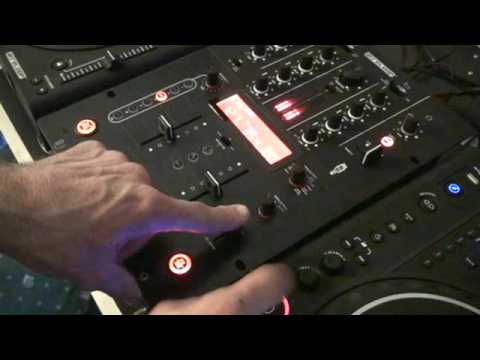
Right guys, now in this video we're doing, well I'm going to do a bit of a demo and a tutorial on the IQ2 from Reloop. It's a two channel mixer, a whole bunch of effects and it's a USB mixer as well so you can bung this guy into your PC and use it in conjunction with some software as well. Now in this video looking at the right hand and the left hand side we've got some effects here which are pretty funky actually. First of all, press that button, it means the effects are ready to be used. This guy here will increase or decrease the intensity of the effect and you'll see on the screen there, you've got a little readout and when it's at 100 it means the effect is full on. Bring it down as you reduce it, you pull this towards you, you'll see that go from 100 all the way through to 0. Then above that we've got channel select, so A, B, mic and master. In other words, effect, switch that to A and you're on effect on the channel A.
Channel B, mic on your microphone and it's fantastic using your mic on this. And then master, logically what happens there is the effect will be on anything that's playing whether it's these two here, crossfade in the mix etc. And then above that we've got echo, auto pan, flanger, manual filter, auto filter, reverb, trans, pitch shifter and send and return. Send and return is for an external effects unit. Now, if we have a look to the left-hand side of the unit, we've got 1 over 4, 1 over 2, 3 over 4, 1 over 1, 2 over 1, 4 over 1. That's basically for the timing. So, 1 over 4 is a quarter of one beat, 1 over 2 is half a beat, 3 over 4 is three quarters of one beat, 1 over 1 is one beat. 2 over 1 is two beats in a bar, and 4 over 1 is one bar. Now very quickly as well, a lot of people don't like to use 3 over 4 because it's sort of offbeat. It's not dum-dum-dum or da-da-da-da-da-da or dum-2-3-4, dum-2-3-4. But you find, the irony is once you get used to using it, it's a nice sound and it's a nice way...
2:34 See, so how you hit it is how you'll get that beat
We'll put that up there. We'll put the channel select on B. We're on echo. Let's have a listen. By the way... As ever, if you want any info on the tracks, I'll put a lickable clink in the description and the names of the tunes. See, so how you hit it is how you'll get that beat. So it won't always be a dum-dum-dum. It'll be da-da-da-da-da-da, and you can change it. Give it a go, have a mess around, and at the moment you're probably scratching your head thinking what the hell's he on about? But it'll be as clear as mud when you start using it. So again, what we can do here with this guy here, the parameter or should I say the volume depth on the effect. Have a listen. See and again, if you're quick, what you can do, you could turn it off there. Put it on first. Okay, so what I'm going to do as well, another effect I really like with this guy here is a manual filter. Now just have a listen. Don't forget to put that button on. Can you hear? Really high, nice pitch.
4:23 General idea, taking, bass
Now, imagine that this track over here is just about finishing and you could almost bring this in and then bring it in, bang. A bit like using the crossfade but the difference is if you imagine what we're doing here is almost the equivalent of, if I just pause that, taking the bass, taking the midway and mixing in like that with just the treble but instead of having to do this... Like that, with two hands. What you're actually able to do is just bring this down with one hand and you've still got this hand here to pick your nose or maybe read a book or, I don't know, scratch your head or talk to your girlfriend or your boyfriend on the phone. Right, what I'm going to do now is we're going to play this guy here and we're just going to use the manual filter. I'm just going to give you a general idea of what you can do. By the way...
Another good idea as well, with reference to the timing here, what you can do is, let's say you're listening to that track and you want the timing to be perfect, you can tap away here and you will get a readout at the top there. So just a bit of a tip for you. Let's play this tune over here, bearing in mind this is punk style TV. Occasionally, if it does go wrong, it's like, well, you know, it's going to happen, isn't it? But the main thing is that you get a general idea of what you can do. Try a bit of echo. Get the bass out of the other one. OK, so again, the beauty about using effects in the mix is that it takes away just the, you know... Two sliders up, moving the crossfade. Now if people think this is easy, it is very easy if you're used to it. But of course what you're basically doing is you're taking your mix to the next level because you're not just using crossfade, upsliders and your bass mid and treble. You're incorporating a few effects as well. Now it will take time, it's like anything, it's about practice. So if you want any more information, like I said, have a look.
The links are in the description, and as ever, enjoy while you practice.
This transcript was produced automatically from the audio of the video and may contain mistakes.










