 3:38
Serato Video DJ How to Change the Video Transition
Contents of the video
0:01 Change the transitions in Serato Video
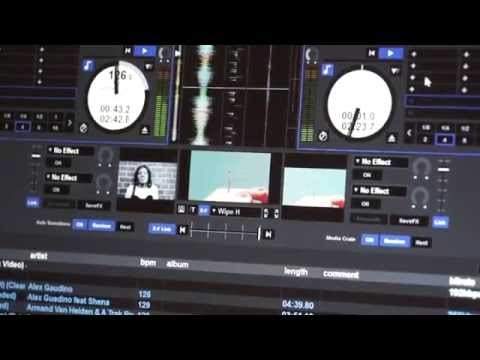
Alright guys, in this video I'm going to show you how to change the transitions in Serato Video DJ. Now first of all, if you haven't got Serato Video, you will need to upgrade and in a future video I'll show you exactly how to do that. So once you've got Serato Video in front of you and you've got a couple of videos good to go, Three screens, right, middle and left. Right corresponds to the right turntable, left of course to the left. The middle one is your monitor. That's pretty much exactly what the crowd will be looking at. And you can change the transitions very simply, quickly and easily even while you're video mixing. So you don't have to think, right, you've started the night on one form of transition and that's it and you can't change it. You can.
0:52 It's probably not a good idea
You can actually change the transition at any time during the night, but I highly recommend you don't start changing while you're doing a mix. It's probably not a good idea. Right, so let's have a bit of a closer look. So below now, the centre screen which again this is your monitor. So if I just zoom out the camera up slightly, do apologise for the wobbly bits. So I'm going to move my crossfade over now and while i'm moving the cross fade over you can see that's like the main screen we can see that the center screen is doing pretty much exactly the same but the one on the right the one on the left are staying as they are because they are paused at the moment so if i just zoom in again below the center screen we've got a small icon and we can see a small
2:21 Say scratch
So what I'm going to do, I'm going to actually put the volume down. Press play and you'll notice actually if I just move the trim down so we haven't got any audio at all. It's just so if I haven't got any audio, I don't get crap from YouTube. So now we can see that it's transitioning from one to the other. And just to prove a point, both are playing and highlight there again. We'll go to say scratch. Hold on, that's the same thing as well. That's the trouble when you use the same video. Hold on, if I just pause that and... Put another video over there. There we go. So, there. So there you go. You can see another transition. So, alright, again, I did say earlier, don't recommend this, but if you wanted to, we're halfway through a mix. So you can see you're actually halfway through a mix and all of a sudden you've decided you want to change the transition. So you can do it, but really you should be concentrating on your mix, not, oh, I don't like that transition, let's just change it.
So that is it. It's really, really simple. I hope that's been a help and I will put information up. I'll put the link to Serato DJ in the video, sorry, video in the description. All right. Practice and enjoy. Thank you very much.
This transcript was produced automatically from the audio of the video and may contain mistakes.











