 14:22
Using the Parameter for the Best Effect with Your Effects Underground June CD Pool 2020
Contents of the video
0:01 Today is the use of
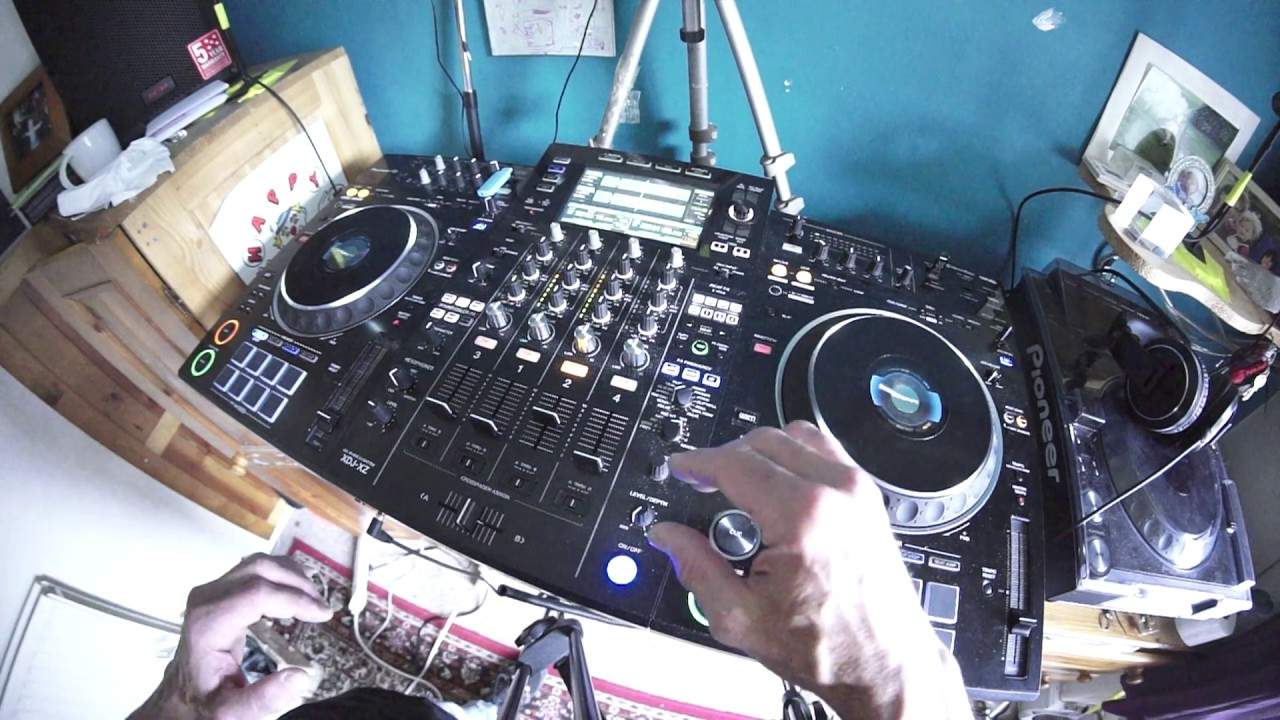
Nice and relaxing, eh? Looking at the name of this, it just says it all. Balearic Elastic, The Some Such Remix. Now what I want to concentrate on today is the use of the parameter dial for your effects. Now, I guarantee you... Most people won't even touch it. In fact, probably a lot of DJs don't even know what the damn thing does. So, let me put the camera there, get a bit of a closer view, and I'm going to turn the screen so I can see what I'm not doing. Alright, so the parameter dial, what's it there for? Well, it's a little bit like the level depth dial on... The other effects, so at the moment I'm using the XDJ-XZ from Pioneer DJ. Right hand side I have my beat effects, left hand side sound colour effects. So first of all, why are they called beats and sound colour? Well the beat effects...
You can get them in time with the music or you can make up your own time signature on those effects. So, you can do what you want with them. Whereas the sound colour effects, that's how they are. That is, you know, however you move the dial will be the sound that you get, of course the sound colour. But, like the beat effects, you have... A level depth on the beat effects and you have something called the parameter on your sound colour effects. Now at the moment I've got my sound colour effects set to minimum, let's have some filter. Let's turn that to 12 o'clock. Can you hear the difference? You've got more emphasis, more feeling with the filter now. In that position, let's turn the parameter off to minimum. It's almost as though...
There's something missing. The body, the soul of the filter effect is gone. And that's because you are taking away a lot of the effect. You're taking away the whole feature of the effect by turning the parameter to the minimum. Now let's try it to the max. That's sounding very strange. Look at the LEDs. At one point when I first did that, rewind, we hit the red. We don't want to do that.
3:15 Here's a New York thing, the original mix
Here's a New York thing, the original mix. The reason I like this sweep is because it seems to sort of cut away a lot of the track. So let's imagine you've got a piece of paper right in front of you and you sort of snip a bit in the middle, at the bottom, at the sides, but you don't cut the piece of paper so it's in bits. You just cut parts of the paper away so it's still, the shape is there, but you've almost cut... Bits out of that shape. Have a listen. As I've said before, the sweep effect is great for techno. I mean it is immense for techno. Alright, this tune here, A New York Thing. What I'm going to try and do is find... Let's have a look. Let's try and find a more techy tune. Again, I want to stick with the underground...
4:51 This is Control, the original mix
Okay, this is Control, the original mix. Alright, this isn't really, this is more like sort of underground deeps. It's not deep house by far. Definitely not deep house because it hasn't got that kind of soulful feel. This one here is Control Yellow, the original mix. I need to find something to demo. Let's try Don't Overthink It. I'm not trying to key mix here. Beatmix definitely, yeah, but just bring it in time. This could be more techy. A little bit more techy. Okay, what I'm going to do is I'm going to speed it up. So I'm going to put my tempo adjust to 16. Right, there we go. Now I'm getting that sort of really nice tech vibe. Oh, I'm liking that now. Echo all over the place. Let's make sure that echo's in time. Just going to tap, flip mode of the echo. Blaze is digging this. Give it some noise, Blaze! Woo!
7:13 I tell you what, this tune's got a hell of a lot of energy
I tell you what, this tune's got a hell of a lot of energy. Don't overthink it, this is the original mix. Don't forget as well all these tunes are taken from the underground release in CDPool 2020. Man, this has got balls big time. Again, if you want the right mix and whatnot, Shazam it. It's Don't Overthink It Original Mix. What mate? 71%, that's fine. Oh, liking it. Again, all I did there... Was I turn the color effect style, then I engaged the filter instead of engaging the filter and then turning the color effect style. Small difference but it does make audibly a dramatic difference. I'm liking that, I'm liking that a lot. Let's try this one. Do as I say. Check this out. It's called the double tap. I call it the double tap so...
9:46 Playing, side, load track
If you really wanted to do that, you're playing a tune on one side, and I think this is the same with the RX1 and the RX2 as well, and you want the same track on the other side. If you just double tap the load button very quickly, it will load up the same track you're playing on the one side. On the other side, not only load up the same track, but it will play it from the position where the first track is playing on the other side. It will carry on playing it in time, so they're both now exactly at the same position. And that's even if the pitch is in a different position as well. It will play same speed, same BPM from the same position. Okay, let's find one more. Let's have a look and see what we've got here. There will be a link in the description to CDPool.com. And don't forget as well, if you're in and around Europe, you want to join in with a CDPool. You're thinking about...
11:47 Readout I can see 88
How do you mix hip-hop? Let's dive into drum and bass. Okay, so at the moment if I look at the readout I can see 88.2 BPM. Now of course it's not going to be that slow is it? I mean come on 88.2 is like hyper slow but all the readouts doing there, all of the software is doing is it's recognizing it in half time. So if you think about it A hip-hop tune of around about 90, 95, even 100 BPM. You could slow that one slightly down, speed your drum and bass tune... Sorry, I'll start again. Yeah, slow your drum and bass... No, hold on. Speed your drum and bass tune up slightly, slow your hip-hop tune down slightly so you can get them roughly the same BPM. I hope that got that right. Again, sometimes dyslexia is terrible.
That's the right hand, yep. And anyone who watches all my videos sometimes will remember me saying, oh, and don't forget, use the left deck. Okay, so listen to this. I'm now going to go to the wide feature. Very important if you do this with drum and bass, you make sure you have your master tempo selected, otherwise it's going to sound terrible. Imagine a hip-hop tune coming in now. You know, like, something like... It's the sound of the... It's the sound of the... Yeah, you know that. Okay, so we're coming up to the next phrase. Halfway through. Maybe by then you've taken out your hip-hop tune. I'm going to slowly increase it, the speed. And then as soon as we get to that next phrase, I'm just going to rip it straight back up.
There we go. Alright, thanks for watching. Don't forget to like, subscribe, practice and enjoy. Thank you.
This transcript was produced automatically from the audio of the video and may contain mistakes.










