 4:38
Watch the LED's on your DJ mixer.
Contents of the video
0:00 This video is all about using your mixer correctly
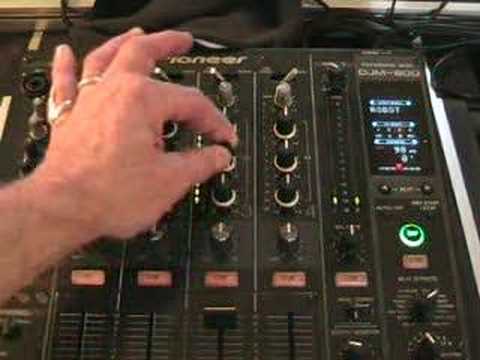
Alright folks, Jonathan here. This video is all about using your mixer correctly. More importantly, looking at those lights on your mixer. Sometimes they're known as LEDs. They're not there to look pretty and to flash, almost like little disco lights. They're actually there and they're there for a reason. They're showing you what's happening inside the mixer. That's very important. So I'll pause the camera and we'll have a closer look.
Okay, the track we're going to be playing is Kelly Rowland, track entitled Can't Nobody. There she is. Right, what we'll do, we'll play the music and we'll have a look. Now first of all, the one at the top here is called the trim. Sometimes it's called the gain. And you'll have, or you should have, one of those above each individual channel and they will be almost like the separate volume controls for each channel. Now watch what happens when I turn it anti-clockwise as far as it will go to roughly about 7 o'clock. No sound at all. As we increase that, we'll actually increase the whole volume. 12 o'clock. Now can you see now it's going into the red? Now ideally, you don't really have to have any channel going into the red. A way of looking at that is if you can imagine you want to record something onto a CD, you want to record something onto a cassette player, anything like that. Well, a lot of people will recommend that you never have anything going into the red.
1:35 You want is when you play
Because what's happening then, you're almost starting to get a distorted signal. And the last thing you want is when you play back the track you've recorded, you don't want to start hearing any distorted sounds. So ideally, you always need to keep your mixer out of the red. You don't want it to go into the red. Now watch what happens now if I press play again and we'll start increasing the bass. Turn that up a little bit. Well there you go. You can see now... Now on this mixer, there's something there called over. Now the reason they put that there is simply because when you start going too far up here, you're actually putting sound through that particular channel. Now the actual sound coming out of your speakers can start to sound distorted.
3:14 Turn, means, bass
But even worse than that, if that isn't bad enough, you can actually start to blow speakers. In other words, if you've got a speaker and all of a sudden you think, well it sounds a bit muffled, it doesn't sound as though there's a true quality sound coming through it. It could be that the small speaker in it, the treble speaker, has blown. If that's gone, then it means you'll get a really muffled, horrible, negative sort of sound. That way of putting it I suppose. Then the opposite, dodgy camera here. Let's say all of a sudden you just get high frequencies and you've got no bass, you've got no bass line, well that basically means that the big woofer has blown as well. Now that's what can happen if you put too much power up here and your amplifier is turned up too much. Now if I play the music again, now if we set the trim here, so now what I've got, I've got the amber lights just knocking in occasionally. Now again, I can still turn this up.
Because I've got my amplifier over there, underneath that dodgy looking van, and I've got the master volume, now watch what happens. I can still make it go loud, but at the same time it's going loud, I'm not putting too many frequencies into this channel here. So very, very briefly, alright? If I now want to mess around with the bass, mid and treble, turn the bass up by all means. Turn the mid up by all means. Turn the treble up by all means, but when you start turning them up and you start seeing these lights going into the red, at that point is the point at which you should start to turn the frequencies down. So a quick insight there, I hope that's been a help, practice and enjoy.
This transcript was produced automatically from the audio of the video and may contain mistakes.











