 4:00
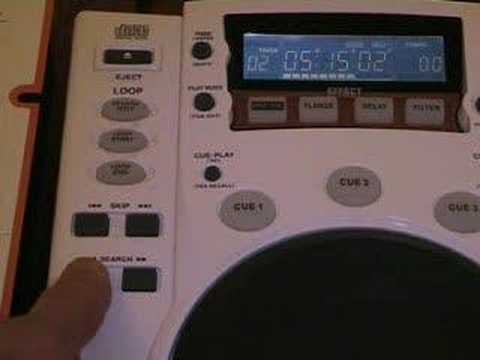
Why does a DJ use, Video 17, The skip/ Search on a CDJ?
Contents of the video
0:00 First of all the skip function
Alright folks, this is video number 17 in a selection I'm doing entitled Why Does a DJ Use? In this one we're going to be looking at the skip and the search buttons on a CDJ tabletop CD player. Now then, first of all the skip function. OK, we can see we're on track 1. By pressing the button once, we move forward one track. What will happen is the CDJ won't play the song, it will just cue it up ready for you to press play. Then if we press it again, we go through the tracks. Now dependent of course on how many tracks are on the CD is of course dependent on how far this particular number will go up. On the other hand though, if we keep our finger on the button, it will skip through the tracks relatively quickly. Now the opposite applies with the other button. At the moment we're on track 10. If I press it once, we go down to track 9. Once again we go down to track 8. If I keep my finger on the button, it'll skip through quite quickly.
1:21 The DJ would be hearing through his headphones, so we press the search
Now with regards to the search button, the search is almost like a music fast forward. Now then, as you can see we're on pause. Now let's just imagine now the DJ wanted to go say a third or a quarter of a way through this track but without, imagine now what we're doing, we're going to be listening to the song but just imagine that the sound you're going to be hearing is the actual sound. The DJ would be hearing through his headphones, so we press the search button. What happens now is we're skipping through the track. Now then basically the longer you keep your finger on the search button is dependent on how quick you will go through the track. If you keep your finger on the search button for a few seconds, you may only go through say 10 seconds through the actual track. If you keep your finger on the search button for a long time...
You will skip through the track quite quickly. Now, the opposite applies if you press the other button. You'll actually go reverse through the track. It's almost like a rewind, like so. Now then, slightly different but quite similar. Let's press play. By pressing the search button, we're skipping through the track. But the difference is when you press play and the music is actually playing, If we de-press the actual search button, the music will carry on playing. So I'll show you again. We'll press play. We'll press the search. It goes forward. Take our finger off the search and the music will still play. Now the opposite applies. If we press the search but the other button, the music will start to go backwards or rewind and then we take our finger off the search but then the music will go forward again.
3:04 Soon finger, pause
Again, the difference being, press pause, press the search, the music will play, go forward, but because the actual button is on pause, as soon as we take the finger off the search button, you can't hear anything at all, because we're still in pause mode. Then if we press the other button, the music will rewind. As soon as we take our finger off the button, the music has stopped again. Because we're on pause. I hope that's been a help and that is why a DJ will use the skip and the search functions. The skip is basically to go through the tracks, the search is for the DJ to find which particular position he wants the CD to actually be in to get it ready to start in the mix. Thanks for watching, practice and enjoy.
This transcript was produced automatically from the audio of the video and may contain mistakes.
Related videos
-
Complete Beginner DJ Lessons Tags Key BPM Etc
A more advanced lesson folded in early, and worth doing once rather than putting off, because everything it sets up gets used for years…
-
Complete Beginner DJ Mixing Lessons Video 19 Getting Your Kit Ready for an Easy Mix
A whole lesson on getting ready, which is the right call - the exercise in the next video only teaches anything if the two decks are…











