 2:59
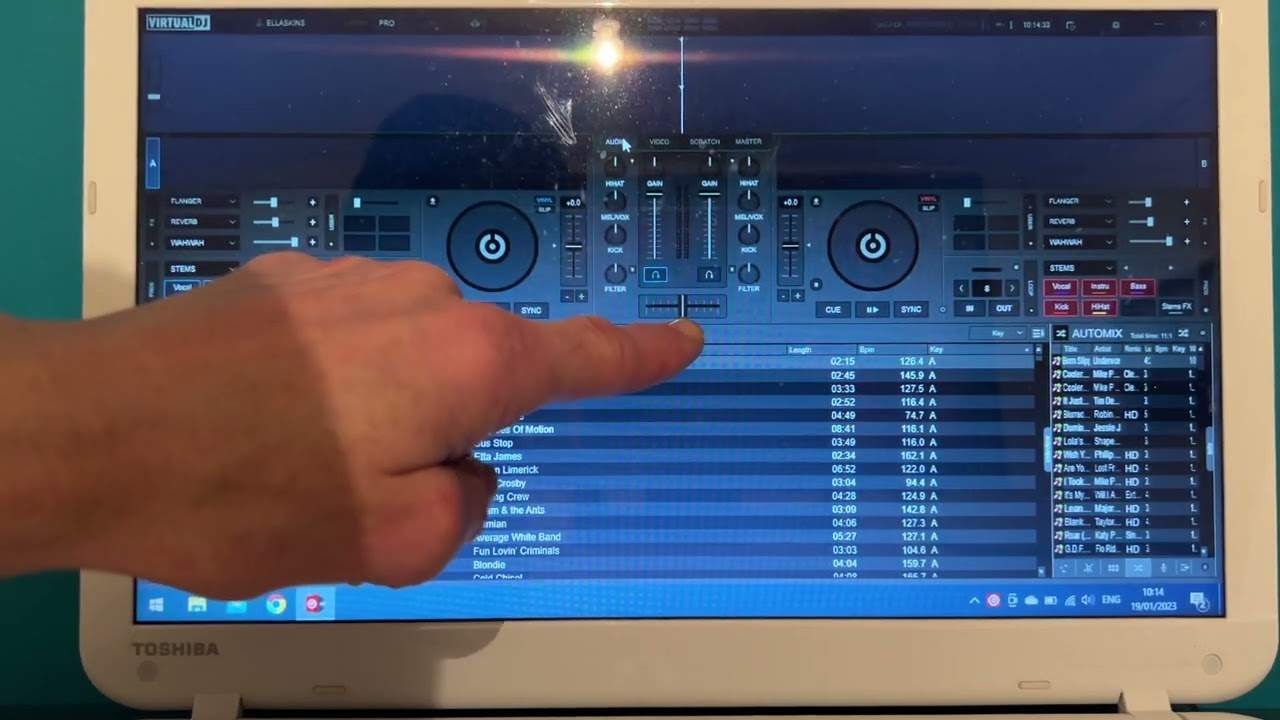
A look at a DJ program layout
On YouTube this video is called Complete Beginner DJ Lessons Part One a Look at a DJ Program Layout
What this lesson teaches
A companion lesson looking at the screen rather than the box, and it makes one general point that saves a lot of confusion later.
The software mirrors the hardware
He demonstrates on VirtualDJ and is explicit that it barely matters which program you use - rekordbox, Serato, Traktor and the rest are laid out the same way, because they are all laid out as a picture of a DJ setup.
Two decks on screen, matching the two on your controller. A pitch control beside each one. In the middle, a mixer: crossfader, channel volumes, gain or trim above those, the EQ, a filter, and headphone icons.
Put the controller and the screen side by side and the correspondence is almost one to one. That is deliberate on the manufacturers' part, and it is the reason you can sit down at unfamiliar software and find your way around in a few minutes.
Two decks, not four
Most programs will give you four decks. His advice as a beginner is to stay with two.
That is right, and the reason is not difficulty for its own sake. Everything you are about to learn - counting, matching tempos, hearing when two things are out - is a relationship between two pieces of music. Adding a third does not teach you anything new; it just gives you more to lose track of while you are still learning to hear the first problem.
The useful habit
The thing to take from this lesson is to watch the screen react while you move the hardware. Every physical control has a counterpart on screen, and seeing it move confirms the two are talking to each other.
That is also your first diagnostic: if a knob does nothing and its on-screen twin does not move either, the problem is the connection, not the knob.
Contents of the video
Video number one for the complete and utter beginner and this is a new selection of videos looking at DJ programs. The programs you will use to utilize your controller and of course play music. Now I'm going to generalize here, I'm just using one program but what I'm about to explain in this small selection of videos will pretty much cover every single program whether it's rekordbox, Serato, Traktor, I'm using a software known as VirtualDJ. I'm not using OBS so we're getting a direct feed. As you can see this is live, you can see me in the background, I like to point at things. So what you're looking at is what you would get if you had your PC program. Now I'm going to cover the parts of the program that you will have also on your program. What I mean by that is I'm using VirtualDJ but it's practically
The same if you're using any of the program. So I'm not going to go in depth, I'm going to show you very basically what you will have that's the same as say for example VirtualDJ. So in this video we're going to look at the basic layout and how that corresponds to the controller that you've got. Now all controllers will have two turntables and you can see two there. A lot of programs you can have four turntables.
If you want to but generally as a beginner great idea stick to two so we have our two turntables next to our two turntables we have our pitch controls and in the middle this is like our mixer so if we look we have our crossfade that will move side to side exactly like your controller we have icons here and these are for headphones it's almost like uh an n the letter n with two blobs either side and that icon is for your headphones above there we have gain now they're exactly like the up faders on your dj mixer and above there we have two dials which is gain also known as trim next to the headphones we have an effect which is the filter then we've got a filter which is the filter and then we've got an effect which is the filter
Then we have low mid and high they've named those slightly differently but they're pretty much exactly the same so that's it very quickly very briefly video number one so if you look at your controller and you look at the layout on virtual dj program you can see it's pretty much identical so basically what all of the companies will do they'll pretty much give an exact footprint of the software in relation of course excuse me to the hardware video number one thank you for watching practice and enjoy
This transcript was produced automatically from the audio of the video and may contain mistakes.
This video is part of
Related videos
-
Complete Beginner DJ Lessons Tags Key BPM Etc
A more advanced lesson folded in early, and worth doing once rather than putting off, because everything it sets up gets used for years…
-
Complete Beginner DJ Mixing Lessons Video 19 Getting Your Kit Ready for an Easy Mix
A whole lesson on getting ready, which is the right call - the exercise in the next video only teaches anything if the two decks are…











