 10:23
Beat Matching Tutorial on the Reloop TERMINALMIX8 BY Ellaskins the DJ Tutor
Contents of the video
0:01 This is a beatmatching tutorial for complete beginners
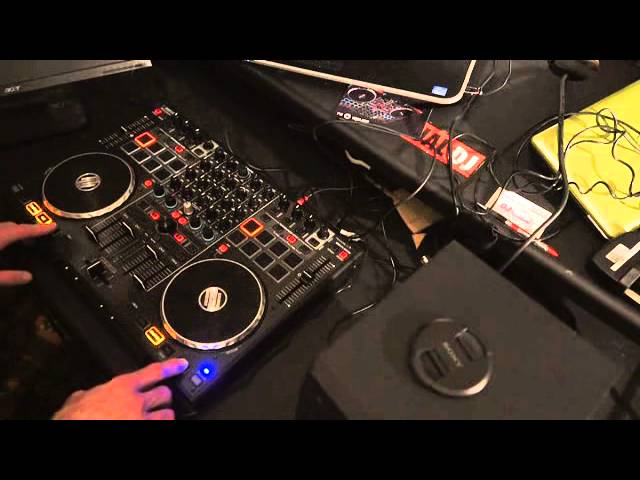
Alright guys, this is a beatmatching tutorial for complete beginners. In this video we're using two tracks, one called Christmas Anthem, the other one Like It. Like It is on the right hand side, Christmas Anthem is on the left, they're by ProTech and I'll put information on the two tracks in the description. First of all, this is Like It and the Christmas Anthem. If we have a look at the hardware, the piece of kit in front of you is by Reloop and it's known as the Terminal Mix 8. It's a four-channel controller with loads of features and effects, etc. But this video is mainly targeted for people who want to get away from using the sync button and try and start to learn how to beatmatch using your ears instead of the program.
Main reason for this is you may think by being a new DJ, press sync and away you go, you can do perfect mixes. Well, you may be able to do that, but there will come a point in your DJ career where you'll turn up in a nightclub or some party, you won't have the use of the sync function and you could be pretty much stuffed. So you need to start from basics first, it is so important. Okay, these two tracks are both at 129 BPM. So what I'm going to do is just press play, or sorry, the cue button, we've got cue on both of them. And if I press play pause on both of the tracks at the same time, because they are the same, both the same BPM, then they should stay in time in BPM. BPM, by the way, is short for beats per minute.
Let's press play pause on both of them.
2:11 You can pretty much hear that they are in time
Okay, you can pretty much hear that they are in time. So just going to press cue on those again. Right, what I'm going to do now is I'm now going to, on one of them, doesn't matter, I'm going to put that over the screen so I can now not see the BPM. Now of course I know it's at 129 BPM because that's where it was. So what I'm going to do now with the pitch is I'm going to move the pitch down. Now, I'm sort of cheating because A, I know I've moved it down which means I know I've got to move it up. But also I now know that this side of the Terminal Mix 8 is going to be slower. And I can demonstrate that by doing exactly what I did earlier on. Pressing... Let me make sure they're all cued up, pressing play pause and we can hear that they're going off-beat.
We can hear they're off-beat. But of course I also know that this one's slower. I also know that where the pitch was set earlier on is exactly the right point where they'll be in perfect time. So in a way, this is a good exercise for someone who is a new DJ because you're giving yourself a couple of tips straight away. You know that the one is a lot slower. You'll know you'll need to speed it up and you'll know at what point roughly where the pitch has to be where they will be in perfect time. So this is the deal, this is what you need to practice. What I'm going to do now is do exactly the same. Press... Press... Start it up. And press play pause with both of them.
They're off. What I'm going to do is I'm going to move the pitch slightly towards... Towards me, very slightly. Now I'm going to try and listen to see how much further away those beats were or how much closer they were together. Also, how long it takes before they start to go off-beat. Now here's the deal. If they start going off-beat very quickly, it means that by all accounts they are different BPMs but the BPMs between the two of them, there could be say quite a vast difference. So on... If you think about it, while they're kicking together, they're in perfect time. If they're not kicking together but the kicks seem to disappear from each other very quickly, that means the BPM is very different. If the kicks are still together for a short amount of time but then they start to glide slowly
Away from each other, that means the BPMs could be quite close together. So I'm listening for the difference in time between the kicks being close together and not close together. So the difference in time from the first time I heard the kicks and now this time which is the second time. So we'll cue them up again.
Right here we go.
5:44 Again they were definitely off
Now again they were definitely off. But... I don't know if you noticed, the difference in time seemed to shorten. So we'll do the same, I'll move the pitch towards me again and we'll do exactly the same, volume up and off we go. Now again, the difference in time is starting to get reduced so I'm going to do the same thing again. I'm gonna bring the pitch up towards me and off we go again.
Exactly the same thing happened. They went off-beat but the time it took them to go off-beat was a lot shorter. That is the key. Now you'll notice as well that we've got a little blue LED shining there. That tells me that the pitch is in the centre point of the pitch fader itself. But of course this one here isn't shining green... sorry, green, duh, blue. So I'm gonna move that towards me again slightly bring them up and off we go again. Okay, again we had a difference in time. It took a lot longer for the beats to go off. So this process may take a while but what it's doing, it's showing you it's giving you a visual interpretation of what's going on because you're needing to look at the pitch you're needing to see where it is
What position it is also in relation to the amount of time it takes for the beats to go off. The longer it takes the beats to go off means that the closer the BPM are together. The quicker it takes for the beats to go off time means that the further away the BPMs are. So I'm going to bring the pitch up again and let's try it again, here we go. Let's try it again.
8:28 You see I've just noticed I've actually gone too far
You see I've just noticed I've actually gone too far. So what I'm going to do I'm going to use the other pitch as my reference and let's see what happens here now. Now bearing in mind I haven't looked at the screen I would say they're quite close they're quite close I can't at this point say they're perfect because I haven't looked so you're looking at this at the same time as I am, first time so let's just get it in focus 129 129 and that is, there you go 129 so that wasn't too bad. Alright I'll just get that in focus so you can see right there you go 129 BPM there and that one there is 129 BPM So give it a go and try like I said at the beginning of this video it's so important for you to use your ears first once you know how to beatmatch
Then by all means if you want to use sync what it does then it gives you more opportunity to start adding effects and start doing some cool tricks but learn the basics first because believe me DJs who started years ago on vinyl turntables did not have a readout showing them what the BPM is alright, hope that's been a help practice and enjoy thank you very much
This transcript was produced automatically from the audio of the video and may contain mistakes.








