 14:40
Beginner DJ Mixing Beat Matching Tequnique Using the Same Track Lesson Tutorial
Contents of the video
0:01 First of all you can see me in the background
Right ladies and gentlemen, first of all you can see me in the background. Hello! I've got my phone videoing. I used to use sort of cameras and whatnot, video cameras, but now with, you know, these modern day phones, the cameras are so good on them. No need. You can get up to 4K. Anyway, digressing, but here we go. Right, so what have we got here? First of all, a big shout thank you very much to Hospital Records for letting me use their tunes. Again, I'm allowed to use them on YouTube. Free of copyright or anything like that. But of course, a big shout out to Hospital Records. So there will be a link in the description to this amazing track, All Night Camco and Crooked. I'm using the Xperia Remix and there will be info on this track in the description. So let's play it. I've got it on both sides. Now this is really a beginner tutorial lesson on just practicing your beatmatching. That's it.
Again, same track on both sides. Loving this. I mean, that's a tutorial in itself because basically when people use the filter, they have the dial set at 12 o'clock, engage the filter, then use it. Whereas why don't you try to move the dial first, then engage the filter so the effect is slapped straight in there instead of from no effect to an effect. Subtle, but there's a difference.
1:52 Top here, you know, we've got
Anyway, what we're going to do is some very basic beatmatching technique or a beatmatching technique. But also this is to help your ears get in tune with what's going on. Now, of course, the thing to do here is to use the same track, same file, both sides. Now, a few of you may be thinking, well, it's the same track. What's the difference? I mean, if we look at the top here, you know, we've got three minutes, 50 seconds, 0.433. Three minutes, 50 seconds, 0.433. Pitches in the center, pitches in the center on that side. Everything's identical. But there is a subtle difference. Now, hopefully, if you have a close look at the two screens here, top right hand corner, you should see a difference. I'll give you two more seconds. You can't find it. You can. I'm sure some of you have plus and minus six, plus and minus 10. Now, what does that mean?
Now, it's the percentage of variation when you use the pitch. So again, I have talked about this before, but we're always getting new subscribers and this is really important. When you're beatmatching, you're doing a set and you just feel the pitches are not right. It could be because one of them is plus or minus six or eight or 10. The other one could be a different number. If they are, then you need to make sure they're both the same. Otherwise, it's going to be really difficult. It's really awkward to mix tracks because one pitch, you're going to have to move it quite a bit. The other one, not as much. The reason for that is the percentage is, of course, based on the BPM of the track. So, for example, if your track was 100 BPM and you're at plus and minus six percent, move it all the way as slow as it can go. You're going to reduce it to 94 BPM, bring it all the way towards you, 106 BPM. So that's it. That's an easy way of explaining it.
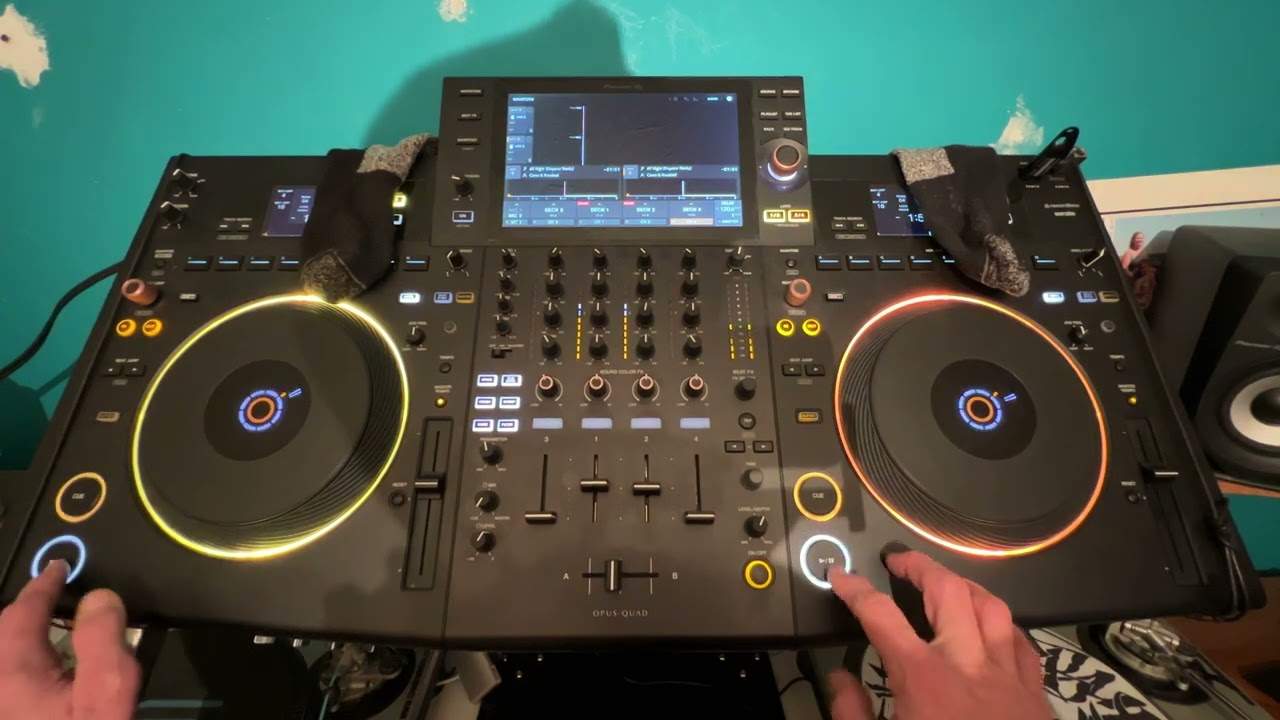
But what we've got here now is we are pushing the envelope very slightly. We have got one side at plus or minus six, the other one at plus or minus 10. So what that means is that when they're dead center, they will indeed be the same speed. But if I move the pitch on the right hand side, the plus and minus six down, say about a centimeter, and then move the other side, the plus or minus 10 down about a centimeter. They are going to be the same speed. So we're going to be different BPM. Of course, we can see that if we look at the BPM readouts on the screens. But what you need to try to not do is look at the screens. So I'm going to go into my sock drawer and I'm going to do this live and I'm now going to pull out two socks.
4:45 Is there anywhere else where we've got the BPM?
God, yeah. Oh, you don't want to be here. I'm going to put that one there and I'm going to put that one there like that. Just like that. Let's have a look. Is there anywhere else where we've got the BPM? Right, we've got BPM 120. Uh, let's have a look on three. Oh no, sorry, BPM is bloody delay. Sorry about that door, right? I cannot see anywhere now on that center screen BPM at all. Nothing there. All right. So the objective here is for you to start the tracks at the same position. And keep them in beat. Now, of course, even though the pitches look to be in the same position roughly, even if they are in the same position, they were exactly four and a half millimeters away from the center. They're not going to be the same BPM because what's happened?
I've reduced the speed of the right hand side plus or minus six slightly less than, of course, reducing the left hand side, which is a plus. And minus six. And minus ten. So, of course, 100 BPM plus or minus six minus 694 plus and minus 10%, 100 BPM all the way down to as far as it can go slow or as far as I can get it to slow down, it will be, of course, 90 BPM. So this is the key here. The idea behind this video is to train your ears. All right? So that's what it's about. The likes of controllers like this is the Opus Quad. From Pioneer DJ is there's no real need for a laptop anymore. All of the information should be on the monitor, the screen in front of you and of course the screen to the right and to the left.
7:23 This is something you will learn over time
So here we go. Now then I'm going to talk you through what we can hear as well. We can hear an echo straight away that tells us it's out of beat. Let's just pause it again. Also, what you should have heard is almost a weird kind of effect. It's known as a phasing sound where the two tracks seem to be moving together, but then the phasing sound changes frequency. Now when you get a phasing sound and it doesn't change frequency, that means they're in beat. If you get a phasing sound and it changes frequency slowly, they are very close to the same beat. If you get the phasing sound and it changes quite quick, then they're not very close. Now this is something you will learn over time. This isn't something you're going to learn in two minutes and go, I get it.
9:46 We're at tempo 2.16
It takes time and experience. Here we go. We can hear the echo. You hear that echo big time now? There's that phasing sound. Seriously, you can have a lot of fun doing this again. It's all experimental and I'm using both tracks coming through the PA. And the echo, so the right hand side too slow. There's that phasing sound. Echo goes too fast. There's the phasing sound again. Okay, there's that phasing sound. Now I'm going to pause it. I don't think I'm bang on the money, but I'm pretty close. Okay, so let's take those off. What are we at? We're at tempo 2.16. 2.55, hold on, let me think is that right? Okay, it doesn't tell me the BPM now that I'll tell you why it's probably not showing me the BPM is because this is a very basic MP3 file.
Okay, so I'm not going to redo this video because if anything, it's more difficult to do it this way because I can't see the BPM. All right, which in a way is a good thing. And if you're not familiar with drum and bass, basically what you're looking at is drum and bass can be counted in half time or double time. So half time it's normally 80 to 85 BPM, 8 and 8 is 16. So you're looking at 160, 170ish BPM. It depends sort of on the speed of the drum and bass track itself digressing again. But if some of your software all of a sudden says, oh, 75 BPM, but it sounds fast. That's just because it's picking it up in half time. That's all. So if you do see a low number, just double it and that theoretically should be the actual speed of your track.
12:12 It could be the right or left, depending on which one you use
Okay, so I mean, I'm relatively close anyway. Now, again, I've reduced that to 2.16%. I've reduced this to 2.25%, so I am pretty close anyway. All right. Now, I hope a demonstration and a tutorial like this will help. And again, the only reason I'm not using headphones is so you can hear the entire mix. If you wanted to use headphones, what would happen is something like this. Now, first of all, you would, of course, put one side down. You would have that side with the volumes down. You'd monitor that side now in an ideal world. The best way to do it is the side that you've got down. You have two headphone cups. You have one headphone cup over one ear. It could be the right or left, depending on which one you use.
And you will find soon enough you'll get used to using your right for monitoring or your left for monitoring. For this demonstration, if you're using headphones just for argument's sake, right cup over right ear, left ear then is used to monitor your PA system, your monitors actually in your room. Make sure very important as well that the actual sound pressure level, the audio level of your headphone is the equivalent level of the monitor. So what you don't want is the monitor. Blasting and your headphone low or your headphone blasting and the monitor low. And actually, there's no need to have both of them loud. In fact, sort of the quieter they are, the better it is. If it's too loud, the speakers are going to be overreacting and possibly won't give the true sound definition.
So you need to have excuse me, a good optimum level where you can hear every little sound. Now what will happen? When you're using your headphones, not only will you hear an echo, but the sound will actually seem to travel from speaker into the middle of your head and your headphone from your headphone middle of your head and to the speaker. It's actually a way of listening to the sound moving inside your head and in the room. It's quite a bizarre experience. Let me know in a comment if you do get that kind of experience. All right now again, this really is for beginners. And I'll finish this video off with if you are a beginner DJ and you're stuck at looking at beat grids and lines and matching up BPM and stuff like that,
That's all well and good. But try and go back to basics and use your ears because what you'll find is the more you can do this naturally by excuse me, by yourself without having to look at screens all the time, the more you will enjoy DJing and it's almost it's more organic. Feeling of choosing a track, chucking it on and listening to it instead of choosing a track that the computer has told you to play. Looking at what the computer is telling you what to do and doing what the computer tells you what to do. Go back to basics. I hope that's been a help. Thank you for watching practice and enjoy.
This transcript was produced automatically from the audio of the video and may contain mistakes.








