 16:28
Beginner Simple to Follow Beat Matching DJ Mixing Lesson BY Ellaskins the DJ Tutor
Contents of the video
0:00 Jonathan here, The DJ Tutor
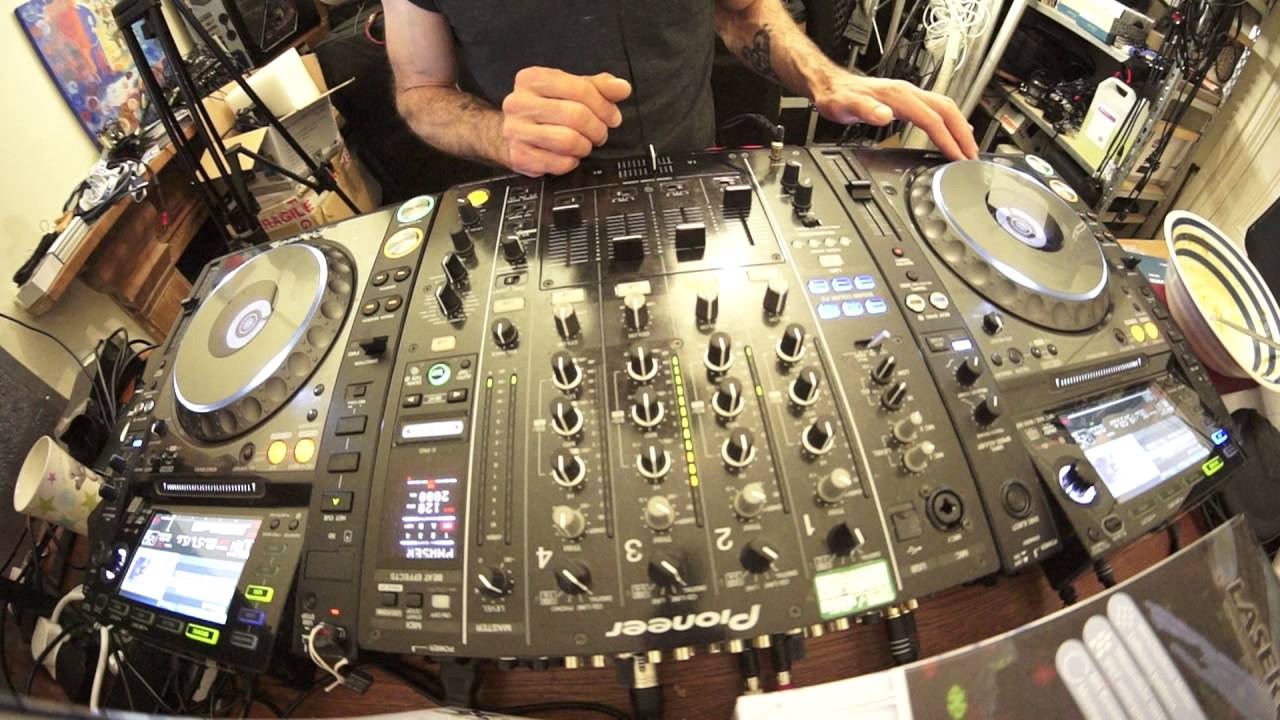
Alright guys, Jonathan here, The DJ Tutor. This is a beatmatching DJ lesson for beginner DJs or for that matter people who are maybe finding it difficult to beatmatch. The track I'm using by the way is from Karmic Power Records. It is KPR-178, a track entitled Filter. There will be a link in the description to Karmic Power Records. So, first of all, what I would like you to do is find... A track that you're familiar with. Then I want you to put the track on both sides. Now, if you have the track on a CD, make a copy and put it on the other side. If you have the likes of the Pioneer kit, you can just link it. If you're using a controller, then it's very simple. Just click, load to the right and load to the left. You're done.
The next thing I would like you to do is make sure the pitches are at exactly the same point, at the centre. And you will know that they're at the same point because if you look at the readout on your CD player or on your software, you should see 0.00. That means that the track... Playing is at the speed that the producer made it in the studio. You don't want to increase it or decrease it. Bearing in mind this lesson is for complete beginners or people who find it difficult to beatmatch. The next thing you need to do is... Go to one of the decks, right or left, doesn't matter, and go towards the end of the track. Now, if you're playing house music, you're going to be looking around about the last minute. What you want to do is set a cue point at around about the last minute, not just the last minute, we need to find the last phrase or the second from last phrase.
Now, in house music around about the last minute you will have 32 bars. Now if I press the hot cue here which I've already done, we're pretty much one minute and one second. Now I know that that is a phrase, the beginning and end of a phrase. Have a listen. Now did you notice there was a change? There was almost like a break in the beat and then the beat came back in. Have a listen again.
2:37 On the other side you need to set the same track at the beginning
There, and there. That is where you need to set your hot cue. For this particular track it is, believe it or not, one minute and one second point three five seconds left. Okay I'm just going to cue that up for the time being. On the other side you need to set the same track at the beginning. Now this sort of demonstration may not work with every single track. Simply because the track you're using may have a different key at the end of the track, it may fade out. You are looking for a track that will have a steady kick all the way through to the end. Having said that, if you're using the likes of hip-hop then you can do the same with hip-hop but if you have got a track that is three and a half minutes long then you may find that your phrasing has been reduced
From 16 bars per phrase to maybe 8 or even 4. It might be slightly more difficult. So, try and find... I apologise about the dog barking in the background. We're just trying to chop its head off and... Are we having beef... Sorry, dog stew tomorrow? Yep. Right. We are. OK, thank you. Can I have mine with pepper? OK. Salt. Right, OK, thank you. See, dog stew... Oh, are you kidding? Right, OK, so... We have got the same track at the beginning, let's have a listen. And we have set a cue point at the second from last phrase in the same track. Now there's two things we can do here. One, and I will demonstrate both. One is we can press the hot cue at the same time as pressing play on the other side, as follows. There. Also, the track on the left-hand side...
4:53 My headphones are cued up on that track
Which is the one I'm bringing into the mix, the volume is down. My headphones are cued up on that track. Also what I'm going to do is I've got my headphone now, one of my cuts over one ear. That is the ear I will be using to listen to this track. This ear will be listening to the PA system and this ear is listening to the end of the same track on the right hand side. Now first of all What we can do at this point when we have pressed the hot cue and play is just listen to the track on the left through the headphones. No need to even bring it into the mix. Alternatively, we can listen to it on the headphones but we can also bring it into the mix as well. Now this is quite important. What I want to do, I want to make sure that the audio level, this is the key.
The level of audio is equivalent in my ear as it is in the other ear. In other words, my headphone cup is very close to my ear so of course the audio level is quite low simply because the speaker in the headphone is very very close to my ear. The speaker in the PA is further away so the volume will have to be higher. So we need to get a nice level where we have the sound pressure level from The speaker into this ear is equivalent to the headphone speaker in the headphone. Okay, so first demonstration, press the hot cue and press play at the same time. And here we go. Now what I am listening for is phasing. We're using the same track. I am listening for the sound to almost double over each other.
6:54 I'm listening for like an empty sound
I'm listening for like an empty sound. It's almost as though the sound seems to disappear, seems to change. Now this is both together. There, brought in the beginning. Now that is the sound I need to listen for. This is the sound I don't want to hear. So, here we go. It's like tapping sound, an echo sort of sound. You hear that sound, this is the point. When you need to move the jog wheel, don't need to move the pitch because they're the same. Move it one way to begin with. You notice that sound has disappeared. That means I moved the pitch, the jog wheel sorry, in the right direction. Let's do that again. I'm going to move the jog wheel. Now, I heard that that echo started to get even worse. It was almost as though the echo was this close together and now it's further away.
9:16 I know that is the beginning of the phrase
That means that I moved the jog wheel in the wrong direction. I need to move it now in the other direction. That echo is reducing. That's telling me I'm moving the jog wheel in the right direction. Now I'm getting that sort of phasing sound. There we go. We've got the phasing sound. Volume down. There. Okay, so that's the first way of doing it. The second way, which is a little bit more difficult, but it's very, very good. Practice. My hot cue. I know that is the beginning of the phrase. What I'm going to do, though, is I'm going to go back a little bit from that hot cue and I'm going to set a new hot cue roughly... I just spun it back a little bit. What? One bar, two, three bars? So, I've now got to not only listen for that change,
11:44 I'm also yet, a few people will probably be saying yet, the screen the
Press play. I'm tapping on the cue as well, getting myself ready to bring it in. And let's bring it up. Let's see if we've got an echo. Slightly off. Move that jog wheel clockwise. There we go. Can you hear the sound? It's sort of rising. Oh, it's dipping again too far. There we go. Volume down on my right-hand side. There we go. Okay, so this is a beginner lesson. And this is like the beginner way of learning how to beatmatch. Now let's take the beginner lesson to the next level and make it slightly more difficult. This is where you need to cover the screens or maybe just dip your laptop down so you can't see the BPM readouts. To just look at a screen. Gawp at a screen because the screen tells you what's going on, the BPM, how long the track's left, so on and so on. But it's about using these. Use your ears. I am now going to move these pitches up to around about the same place. Now as you can see, I cannot see the BPM. Alright, I'm also yet, a few people will probably be saying yet, the screen there. I'm going to cover the screen on the mixer as well.
The process. But the pitches, even though I have brought them up to around about the same place, for example this one here could be 128.4, the one on the left could be 128.2, so they're not going to be perfectly beatmatched. They may be in beat for a short amount of time, but sure enough because they are not exactly at the same BPM, they will... Very soon, or eventually, very quickly or slowly, depending on how far away the BPM is, be out of beat. And that's when we will get our echo sound. So I'm going to press my second hot cue, which was the one that I set, which was about two or three bars before the phrase. Same process now, but this time I need to use the pitch and the jog wheel. Two, three, four.
14:01 I'm now going to repeat the process
Now I'm listening for that sound, either the echo or the phasing in my ear. Now I can hear the phasing but I'm hearing it only while I'm moving the jog wheel clockwise. Now that tells me this pitch needs to be more towards me. I'm only going to move it a tiny amount because if I move it too much, I may end up moving this too much, which means it will no longer be slower. It will be faster. So I'm now going to repeat the process. You may have to repeat this process, have to repeat this process 50 times, 20, hopefully not bloody 50 times. Otherwise take a fly arranging. You may have to repeat it quite a few times. But eventually, what eventually? There is too much butter on those trays. No, no, no, not those trays. Herds of wildebeest sweeping majestically across the fields. Teak, mahogany, rosewood. Do you get that? OK, so I'm going to repeat the process. Try again. Here we go. One, two, three, four. One, two, three, four. One, two, three, and...
No, don't like start moving it loads straight away. There's no need because you're relatively close anyway. Okay, so 129.5, 129.5, 4, 5, 4. It did change, it went, oh there you go, it's 5. Okay, so I hope that has been a help. Let me just take the camera off, grip a point here. Yep, you're going to be going in circles. Do apologise, I don't like editing videos. Okay, 129.5, it's a bit blurry, I do apologise, on 129.5, it can be done. Alright, check out the link in the description for Karmic Power Records and I will finish off. Thank you very much for your practice and enjoy!
This transcript was produced automatically from the audio of the video and may contain mistakes.








