 6:13
Beatmatching with the cue button
On YouTube this video is called DJ Beat matching tutorial Using the CUE on a cdj turntable
What this lesson teaches
A beatmatching lesson organised around the cue button, and the argument for it is about how many tries you get.
Unlimited attempts
With cue, you can return to the exact start point in a split second - no searching, no scrolling, no losing your place.
Which means you can try the same drop over and over. Press, listen to how it lands against the other record, release, adjust, press again. Each attempt costs nothing and starts from an identical position.
That is enormously more practice per minute than any method where you have to find the start again each time, and it is why this is the right technique to drill with.
The order to do things in
His sequence matters:
Set the pitch first. Get the tempos as close as you can with the fader, before worrying about position.
Then use the jog to fine-tune. Once the rates are close, the jog handles the remaining alignment.
Doing it the other way round - nudging into place and then discovering the tempo is out - means throwing away the alignment you just achieved.
The line to remember
He says it almost in passing and it is the most important sentence in the video:
There is no point moving this anticlockwise and then not moving the pitch, because at the end of the day you have got to move the two to keep them in beat.
A nudge buys you alignment now. If the tempos are still different, that alignment has an expiry date measured in seconds. Every nudge should be followed by the question: do I also need to move the pitch?
If the answer keeps being yes in the same direction, the pitch is definitely wrong and you are papering over it.
On personal preference
He mentions that he does not much like using the jog wheel, which is worth noting as preference rather than instruction - it comes from learning on decks where touching the platter was not an option.
Plenty of excellent DJs work the other way. What is not optional is understanding which control does which job.
Contents of the video
0:00 Most CD players have got this sort of feature
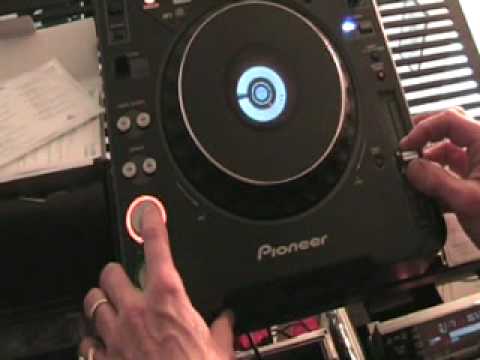
Alright folks, another beatmatching tutorial for you and in this one we're going to concentrate mainly on the cue button. Now most CD players have got this sort of feature. When you press the cue button what happens is the music will start just so long as you've got your finger on the cue button. As soon as you take your finger off the music stops and it will go right back to the beginning of the track. So for example... Sorry. I'll show you. Sorry. Right, here we go. Oh dear.
Okay, now there's lots of ways of beatmatching. One is logically, you know, the track's playing and you can just press play, pause, and the music will carry on playing and you don't have to press anything else. Try and beatmatch it, but of course then, you've got to just press cue again and away you go again. So using this sort of technique, what you can actually do is you can go right back to the beginning of the track within a split second, literally a split second. So for example... So you're still in beat with the music continually. Okay, now what I'm going to do, I'm going to show you how you can beatmatch using this technique. And I'm also going to talk through exactly what I'm doing. By the way, look in the description for the names of the tracks, okay? So let's press play on the other track first. Okay, let's just put that over there. Alright, what I'm going to do, I've got my headphones on.
Now I'm going to listen to this track here. Now me personally, I don't like to use the jog wheel but using this technique you can use the jog wheel but you're more likely to use the jog wheel once you've set the pitch control. I will explain very shortly. Here we go. Speed it up. Now imagine we're listening to this track but just through the headphones not through the main PA. But just for this demonstration we've got it coming through the main PA. Now let's say it was slightly off. I want it to start again.
2:21 Let's say for example now you're ready to go
Now that's nearly, that's just about it. Now if I wanted to fine-tune, maybe slow it down a little bit, anti-clockwise, pitch down very slightly. If I want to speed it up clockwise, bring the pitch towards you. There's no point moving this anti-clockwise and then not moving the pitch because at the end of the day you've got to move the two to keep them in B.
Now you can carry on doing this continually until you know you've got it in beat. Alright, so let's say for example now you're ready to go. Right, what I'll do now is the other track, I'll play that and I'll have that towards the latter part of the track. So let's press play on this one. Alright, now just imagine what I'm about to do now is on the headphones. I'm just getting it cued up. When I say cued up, I'm having a bit of a listen. Make sure we're exactly at the beginning of the count of one. And I now... Now I can press play, pause. Because I got it beatmatched earlier on, no need to touch the pitch, I can just maybe move the jog wheels. Going too fast, keep in mind what you're listening to now would probably be what you're listening to only through the headphones. And now, let's say we can start to bring the volumes up and get the two working together. Still going, this is starting to go a little bit too fast. Was a bit of a rush job though. There you go.
4:14 We can start messing around with the bass, mid and treble a little bit
Now we can start messing around with the bass, mid and treble a little bit. Okay, we're into this one here. Right, so just to recap again. Use the cue, pitch control, and again, the only reason we're using the cue like so is because it saves the hassle of pressing play and then hitting that cue button twice. Small, tiny feature but with your finger on the cue like this, it means you're in more You've got more control over the beginning of the track. Have a listen. And again, let's say for example the track does not start on the count of one. How do you get it there? I'll show you. Right, press play, pause. What I'm going to do now is I'm going to press cue. Like this. Have a listen. Right back to the beginning. Press play, pause. Press play, pause again. We've stopped. Now let's imagine we want to start at that beat there.
What I can do is press cue, now have a listen. That is now my cue point. If I want to just fine tune that to make sure it's perfectly on the beat, I can move the jog wheel like so, and then where I want it set, press cue again, and there you go. Alright, I hope that's been helpful. Practice and enjoy.
This transcript was produced automatically from the audio of the video and may contain mistakes.








