 3:34
DJAY App Video 6 SYNC Icon Demonstration, tutorial
Contents of the video
0:00 Video number 6 in a selection I'm doing on this application known as D
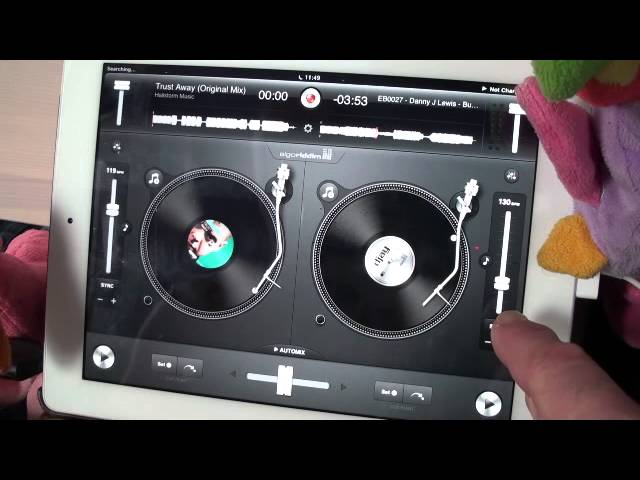
Alright guys, video number 6 in a selection I'm doing on this application known as DJ. It's from a company called Algorithms. I'll put the information in the description along with the two tracks that I'm playing. One on the left here is by a guy by the name of Mr Rick Parkins, one on the right is from Mr Danny J Lewis. In video number 6 we're looking at this icon here. We can see SYNC, short for Synchronization. SYN key is SYNC. Above that we have 124 BPM. This track at the moment is set to 124 BPM beats per minute. So in other words, if you had a stopwatch and you timed one minute, you would get 124 beats in that minute. Over here on this side we have 130 BPM. That tells me exactly the same as the other side, but instead of 124, we've got 130 BPM.
0:56 What I'm going to do is just press play
What I'm going to do is just press play. I'm going to press play on the Danny J Lewis track. If I move the pitch, we can see the BPM amount going up and down. What I'm going to do now is press play on the Rick Parkins track. Bearing in mind the Danny J Lewis is 130, Rick Parkins is 124, I'm going to press play at the count of one in a bar. One, two, three, four. One, two, three, four. Alright, I don't know if you can hear that. It was all over the place. That's because the BPM, the timing was not correct. What we can do with the sync icon is we can make the two tracks be at the same BPM. Now if I press sync on the Rick Parkins track, press there, you should notice that's gone up to 130. If we have a look at the Danny J Lewis, that's 130.
What I'm going to do now is reduce the pitch down to 119 on the Rick Parkins. If I press sync on the Danny J Lewis, that will go down to 119 as well. Now what this will enable you to do is to beat match the two tracks without having to use headphones. So, I will play the Danny J Lewis track and at the moment that's set to 129.
2:34 I'm going to press sync on the Rick Parkins track
I'm going to press sync on the Rick Parkins track. Let's just go forward a bit on this guy. We could hear straight away that the two tracks were in time. If we press play again at the beginning of the track, Danny J Lewis. At the beginning of the track here with Rick Parkins, we can hear the two tracks are in time.
There you go, video number six showing you how the sync icon, synchronization icon works. Have some fun, practice and enjoy.
This transcript was produced automatically from the audio of the video and may contain mistakes.








