 13:54
Intermediate DJ Lesson on Beat Mixing with a Loop BY Ellaskins the DJ Tutor
Contents of the video
0:00 Another new releases for you from CDPool
Alright ladies and gentlemen, another new releases for you from CDPool. Also in this video a couple of tips and tricks. Now if you're not very good at beatmatching what I hopefully will be able to do is help you in practicing how to beatmatch without having to use any headphones. So first of all we're going to mess around with some of the new releases. It's from the underground releases October 2014. We're listening to track 2, disc number 2 over here. We have track 3 from disc number 1. So I'll just skip through this track a little bit. Again if you want any more info on the new releases check out the lickable link in the description and we'll take you to the CDPool.com website, ok?
Ok in this demonstration what I'm going to do is I've got another track ready and they're beatmatched but at the end of this track there's quite a bit of music going on. At the beginning of this track there's quite a bit of music going on and if you put the two tracks together it's wrong, it just doesn't work correctly. There's too much going on so what you can do is you can just chop from one to the other especially when you do get a nice natural breakdown for example in this track. A lot of tracks, EDM tracks finish off with a kick and that's it. This one finishes off with a nice little melody at the end so we'll go to that part right now. There you go. So what I'm going to do I'm going to filter this out
1:52 Not every DJ will formulate their own tracks
And just bring the next one in. That is it. It's not the best transition in the world but it is a transition and if I was to add the beginning of that track over that track there could possibly be quite a lot going on, too much going on for the ear. So tracks like that may be chopped from one to the other and you have to remember that every single transition is different even if the same DJs are using the same tracks. Not every DJ will formulate their own tracks. So what we're going to do is we're going to do the same transition. Okay, track number three here from disc number one from the Underground releases CD Cool Global 2014. Sorry, yeah underground global. Underground releases October not global sorry. Alright let's find
4:39 End of this track, nine disc
Something else on disc number two. The echo go in here. A transition not beat matched. What we're trying to do is keep a similar kind of vibe. This is track ten from disc one. Let's go to the end of this track, nine disc one in a bit. What I'm going to do now
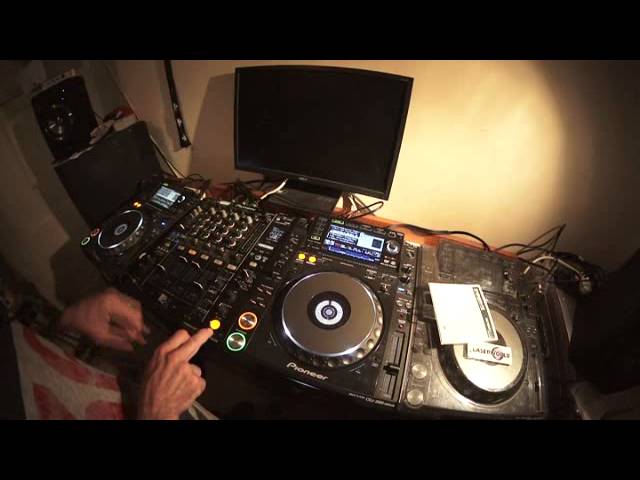
Is find a tune on disc number two and show you how you can start to if you're not very good at beat matching how you can maybe perhaps not perfect it but definitely get better. Okay so let's just find a track. Let's just move the camera over a bit. Forward a bit. A bit of gate there. What gate does is it takes out certain parts of the track. It almost edits it. Okay right so what I'm going to do now I'm going to set up a little bit of effect. This dial to number two because we're on that channel. I'm going to set this to roll. Go back to the beginning of the track. I'm now going to tap in time with the kick and so on. I'm going to go to four over one now so by all accounts when I start press the button here to start the effect, I will have formed a four bar loop. I'm going to
9:08 Here's the difference in the loop
Turn the other channel up. Another channel up. I'm going to turn the other channel up and press start. One, two, three, four. I've now got a four bar loop. If I want to I can extend that to an eight bar loop now. No I can't because I only recorded four bars beg you pardon so we'll keep it at four bar loop doesn't matter. I can stop that track now and have a listen. I don't want to do that. That's a bit of a trick. What I'm now going to do is I'm going to press play on this and beat match it. Right here's the difference in the loop. It's a good deal because I did this manually, it's highly likely which is proven here that the loop is slightly very slightly out of time so for example if it's 0.01 BPM out of time in one loop after two loops it'll be 0.002 and then 0.003 0.004
And so on and so on. So very quickly it will drift quite a lot. So what I've got to do is I have to move the jog wheel to keep it in time. No need to touch the pitch because the pitch was set when I formed the loop, when I transferred the loop so in other words the roll that's now on this channel is exactly the same BPM as the original track if anything is because the roll is slightly out or the loop from the roll is slightly out it means that if I let this play over that loop stroke roll it will go out of time very quickly. I'll demonstrate that again. First of all what I will do though is make sure it's perfectly in time then I'll just leave it. Just leave it listen. You see it doesn't slowly drift
11:20 I'll give you a demonstration there so stop that again
What happens is it will go out of time in steps every time it loops off a bit, a bit more, a bit more, a bit more so the idea here is for you to move the jog wheel in time with the amount or I'll start again the idea is to move the jog wheel in time with the point that it goes out of time, the loop goes out of time. I'll give you a demonstration there so stop that again. Too much, too much. Right let's see. There you go. Okay there was a lot of movements going on there but when I first started doing that I was actually moving it anti-clockwise which is the wrong way so I had to then move it clockwise which is another experiment it makes you understand if the loop is too short or too long alright? So
We'll try that again. Pause that up. You're listening as well for the phasing sound. If you're not familiar with phasing what that is it's when the sound seems to disappear. It's almost so certain parts of the sound cancel out. Try it again. Hope you get the idea. Don't forget check out the lickable link in the description. Thank you very much to CDPool. Underground releases October 2014. Practice and enjoy.
This transcript was produced automatically from the audio of the video and may contain mistakes.








