 7:29
Pioneer WeGo4 & Wedj Beat Matching Lesson by Ellaskins
Contents of the video
0:00 Tune is Disco Zen
Right guys, tune is Disco Zen. It's from Karmic Power Records. There'll be info on the track in the description. We're using the DDJ WeGo 4 from Pioneer and also Pioneer's software for the iPad and iPhone known as WeDJ. So this is a very simple beginner DJ lesson. I'm going to give you an analogy here. Let's imagine that you are, you know, you're very young and you... Your parents just shove you on a bicycle. Well, let's say you're two or three years old. They're not going to, well, hopefully they won't put you on a bicycle just with the two wheels. They will have stabilizers on the bicycle. So, of course, you learn how to ride the bicycle. Then eventually, once you know how to ride that bicycle, you have confidence, you take the stabilizers off.
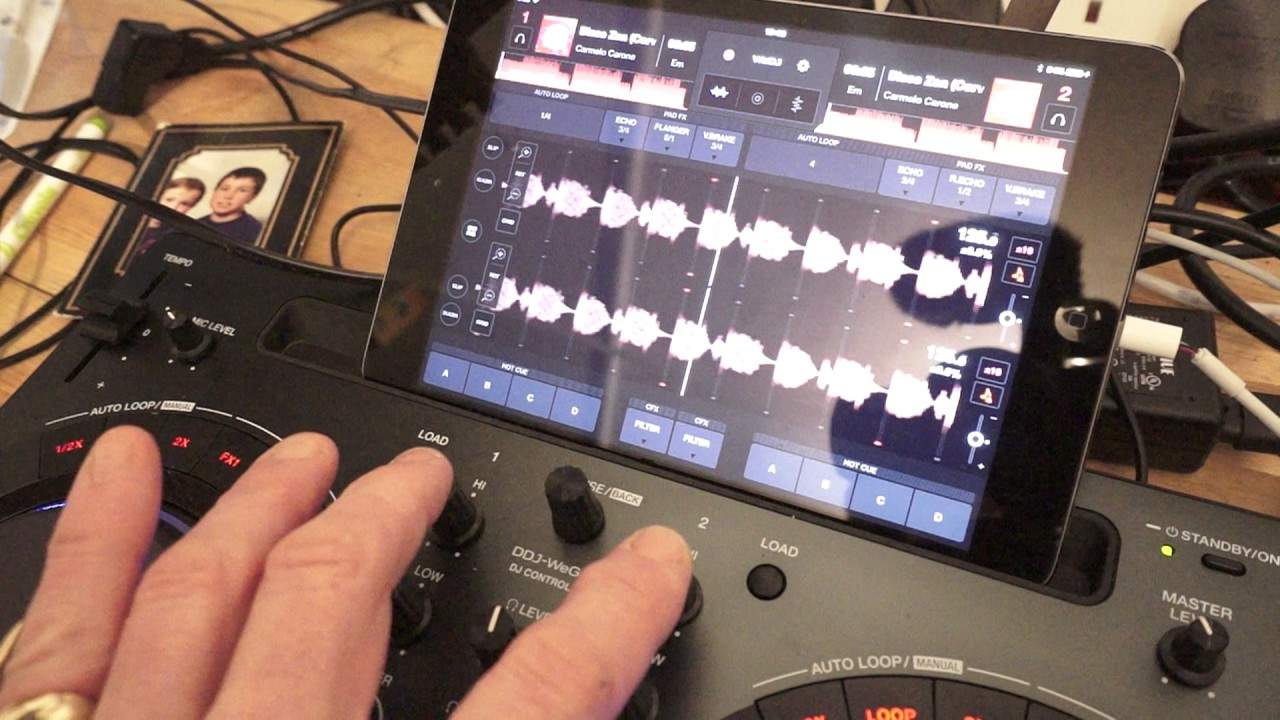
You shouldn't really then, once you learn how to ride the bicycle, go back to the stabilisers. You don't start riding the bicycle for the next 10 years and think, oh I'm going to put the stabilisers back on. It doesn't happen. How does that analogy work with something like this? Well, with this track, on the screen I have the wave format and I can clearly see the wave format of the same track. I've got the Disco Zen track on both sides. So I'm going to start one side like that. Pitch is in the centre. Again, this is another good way of learning how to beatmatch, but also not only audibly, but visually as well. And again, once you learn how to beatmatch using the visual aspect as well as the audio aspect, then you need to take your stabilisers away. Get rid of that.
And concentrate on the sound you're listening for. So, okay, so what I'm going to do, press play, I'm going to start my other deck and what I'm looking for is to make sure that these lines match up perfectly. And one, two, three, four. Okay, now, I don't think you should be able to see that we've got two sort of small red dots every bar and they're slightly off. So, firstly, I need to make sure that they are exactly on top of each other. Now, I've done that. Now also, I'm getting an audio signal here as well. It's like a little thing in the back of my mind, in my ears, it's going beep, beep, beep, beep, beep. What is that? That is phasing sound. Something's happening there. I've got a difference in sound. Now that's what you should be listening for. Can you hear that? Phasing. That's what we're listening for.
2:58 We can hear that phasing sound there
So, not only have we got the visual aspect on the WeDJ app, we've got the audio as well. We can hear that phasing sound there. Now, as the track, whatever track you use, starts to carry on and we go through the track, it's not going to phase perfectly simply because I started one track before the other one. If I wanted it To phase perfectly all the way through, I would just start both tracks at the same time. Crossfades in the middle, both channels are all the way up, the high and the low on the WeGo4 are at 12 o'clock, and the filter is at 12 o'clock as well. There we go, we've got that hollow kind of sound, it's really weird isn't it? But that is known as phasing. Now, it's disappearing. It's almost, if you imagine a hill, and you're climbing up that hill.
Okay, so that double tapping sound is like you trying to get up the hill. If you imagine another analogy for you, as you climb up to the top of the hill, you get closer to the top, you don't have to walk so much, or you don't have to walk and then when you're right at the top, you stop walking, there's no more tapping. But then, as you walk down the hill, the other side, you're walking down, you can hear that double tapping, it's like you're walking down the hill. Back up again.
4:38 You can see for bloody miles
There you go, you're at the top of the hill. You can see for bloody miles. How about that? Now have a mess around with it. Eventually, you need to get to the stage where you do not have to look at the screen. So what I'm going to do now is I'm going to cover that screen over. Now at the moment the pitch is a dead centre. Okay, so let's cover that screen over. Let's just make sure that I can't see anything at all. Just about see through there. I'm going to put that piece of paper. Over there. And this is what you need to do as well. You need to train yourself to not ogle at a computer screen as much as you can. One very, very big reason is that hopefully when you do eventually start playing in front of loads of people, they want to see you looking at them. They do not want to see you looking...
I'm going to bring the pitches towards me very slightly, so now they are not at the same BPM and I can't see the BPM because that's all underneath a piece of paper. Let's start them both again at the same time and let's get that phasing sound worse. Okay, I moved the right-hand deck clockwise. By moving this anti-clockwise, can you hear That double tapping sound isn't getting worse. That's because I'm moving the jog wheel on this side in the correct direction. Oh, you can't see that one. Let's bring that out a bit. Slow this one down a bit on the pitch. It's that facing sound. That's what I'm after. It's close. Let's have a look. 126.8. Oh, it's a bang on. 126.8, 126.8. Okay, there you go. Right, so it can be done.
Right, so give that a go. Again, this is another way of learning how to beatmatch and this is one of the very basic foundations of mixing. I hope that's been a help. Don't forget, check out the link in the description. Practice and enjoy. Thank you.
This transcript was produced automatically from the audio of the video and may contain mistakes.








