 6:08
Table top CDJ, what the jog wheel is for, part 2
Contents of the video
0:00 Piece music, wheel tabletop, moving pitch
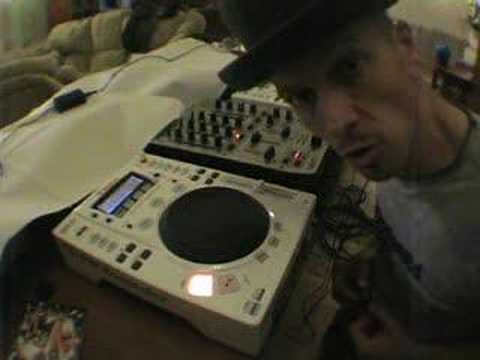
Alright folks, this is the second video in showing you what the jog wheel is all about on the tabletop or the CDJ CD player. Now then, in the first video I basically showed you what happened if you actually moved the jog wheel clockwise or anti-clockwise. Now then, of course the jog wheel on some tabletop CD players can be utilised for scratching purposes as well. We won't go into that just yet. Now then, what you will see DJs doing when they're mixing and they're touching the platter, okay, they're near enough doing exactly what you can do with the CDJ. There's very, very little difference. The only difference I would say is there is not a piece of vinyl on top of this at the moment. Now then, what you'll see a DJ doing, okay, is this. They'll be moving the pitch control down like so.
And then they'll be moving the jog wheel, slowing it down or maybe speeding it up. The reason they're doing that is this. Let's say for example this one here is playing a piece of music but the piece of music playing on this one is too fast so of course you'll need to reduce the speed. Now then, if you move the pitch control down eventually it's going to catch up but there's a way you can actually get it to catch up without Moving the pitch control, and that is to move the jog wheel anti-clockwise. As you're moving this anti-clockwise what's happening is the piece of music is slowing down. Now what you can do then is you can then move the pitch control down a tiny bit. Take your finger off the jog wheel and have a listen. Now then at that point you may find that this is still too fast. If it is still too fast...
1:54 Take your finger off the jog wheel and have another listen
Then, again, anti-clockwise a tiny bit, let it catch up and then move the pitch control down a tiny bit more. Take your finger off the jog wheel and have another listen. If it's still too fast again, then a tiny bit so it will slow the music down. And while you're moving it down a tiny bit, don't just move it like that and hold back. You've always got to make sure your fingers are on the pitch control because you need to be able to move relatively quickly but tiny amounts. So again, move it anti-clockwise and when it's caught up in beat, down a tiny bit more. The reason you do that, if you don't move the pitch down a little bit after moving the jog wheel, all that will happen The pitch control is there. Now let's say this now is too slow. What you can do is you can move then the jog wheel clockwise this time. As you're moving it clockwise, it will slowly start to speed up. The music will speed up but if you leave the pitch control where it is, what will happen as soon as you take your fingers off the jog wheel
All of a sudden, it'll go, it'll slow down again. So this is what you do. Fingers at the ready on the pitch control. Move the jog wheel clockwise, you'll hear it speed up. When it's caught in beat, then move it a little bit faster, okay? And then let go of the jog wheel and have a listen. Now at this point, it could do one of two things. It could be too fast or too slow. Let's say it's too slow. Then what you need to do is put your finger back on the jog wheel. And move it clockwise again until it starts to catch up. And then at this point, when it's caught up, you can see where my hand is, move the pitch control, my right hand is on the pitch control, up again a tiny bit, take your finger off, alright? And then have another listen. If it's still too slow, repeat the process a tiny bit, move it forward.
3:59 At that point, you can start to fine tune
Now, there's going to come a point where it's critical mass time, whereby the beats are just about hanging on with each other. Now at that point, you can start to fine tune. This is where you see DJs, they do this. They're just tapping it, almost tapping it forward, just edging it that little bit forward to get it in beat. But if you edge it forward like that and you have to continually edge it forward, edge it forward, edge it forward, what you're doing... Yes, you're keeping it in beat, but the pitch is out. The pitch is still out. So if you find yourself having to do this every two or three seconds, the way to stop yourself from doing that is move the pitch a fraction, maybe half a millimetre, a tiny amount, and then maybe, let's say, if you were having to do this every two seconds, because you've moved that pitch control a tiny bit more forward...
Speed it up, you've made it go faster. Maybe you've only got to do this once every second and then maybe a tiny bit more again and maybe you've got to do it once every three or four seconds, a tiny bit more again and then maybe once every ten seconds until eventually, ideally, when you've got that perfectly beatmatched, you don't have to touch this at all. Now then, again... With regard to the pitch control, I use a different way of just doing this and I'm slowly fine-tuning it, fine-tuning it until eventually I've got it in beat and I'm messing around here and the actual movements are very, very fine. But utilising this baby here, the actual jog wheel, there's no need to do that because what you're doing, instead of moving the pitch control like so,
In a sense, it's the equivalent of touching, like I said, the piece of vinyl on a turntable. Like so, moving the piece of vinyl or when you're touching here along the side and you're just pushing it forward, it's almost the equivalent of touching the side of the platter as well, right? Second video, hope it's been a help. Practice and enjoy.
This transcript was produced automatically from the audio of the video and may contain mistakes.








