 4:33
Tribe VR Lesson One for the New DJ, Set up of Kit How to Beat Match
Contents of the video
0:00 My name is Jonathan Lewis, also known as the DJ Tutor, aka Ellaskins
Right guys, my name is Jonathan Lewis, also known as the DJ Tutor, aka Ellaskins. Now these videos are for Tribe, also part of the VR crew, the virtual reality crew. Now these videos are very basic. What they are going to do is teach you how to beatmatch. So we're going to go right back to basics. Now of course these videos are on YouTube, so anyone who has been watching me in the past may say that I've done these videos before. Well this now is a selection of step-by-step videos taking you through the process of learning how to beatmatch on the likes of CDJ. Now everything I do on the players behind me, you can do on vinyl turntables and on controller. So it doesn't matter whether you've got the cheapest controller in the world or the most expensive piece of kit out there.
1:28 Two virtual turntables and your mixer in the middle
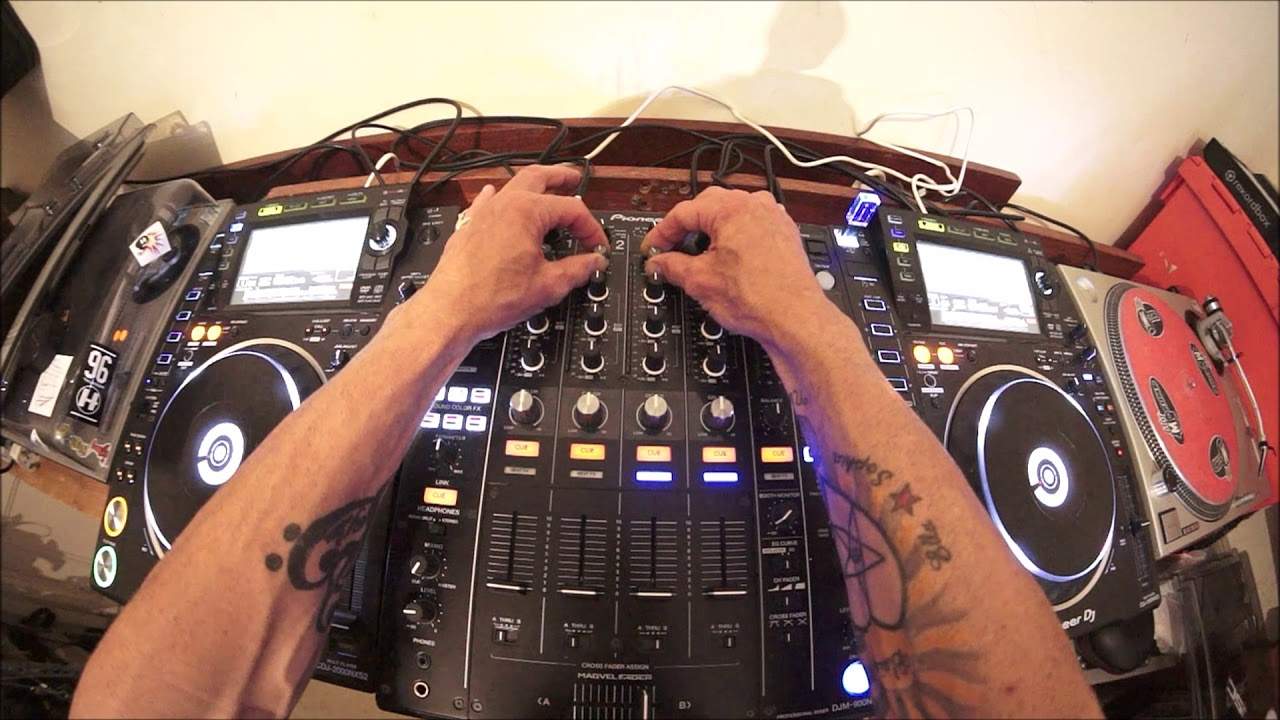
You will be able to copy exactly what I'm going to do. So let's have a go. First and foremost, setup is very important. Now what I'm about to explain to you using these CD players will be exactly the same if you're using the likes of vinyl or for that matter, vinyl turntables. Now if you imagine, if you're using vinyl turntables, you should have two. Your mixer in the middle and a vinyl turntable on the right and one on the left. If you're using a controller, then the setup should be very similar to this. Two virtual turntables and your mixer in the middle. What you need to do is make sure you have the same track on both sides. So the same track, the same file, a mirror image on both. If you're using vinyl turntables, if you want to practice and learn how to beatmatch correctly,
I highly recommend you get an exact copy of the piece of vinyl that you're going to be using. So the track on the right is exactly the same as the track on the left. My mixer in the middle, everything is a mirror image from right to left. So for example, the low, mid and high on the right, will be at 12 o'clock. The low, mid and high, also known as bass, mid and treble on the left-hand side, will be at 12 o'clock. I need to make sure that the trim is set at the same position on the right-hand side and the left-hand side. I also now need to make sure that the pitch control on the right-hand side is dead centre. So I'm going to just bring that down so on my readout I can see 0.6. 0.00, meaning now that the track is at its original speed
3:01 This is very important for this demonstration
When it was made in the studio. And I need to do exactly the same on the left-hand side. Bring the pitch fader to the centre position to make sure that as well is at 0.0%. Now this is very important for this demonstration. Now video one is all about the setup. So just to recap, the same track on the right-hand side as the left-hand side. If you're using CD players, if you're using a controller, make sure that you use the same file. Not different files of the same track, the same file. So everything will be the same. If you're using vinyl, make sure you get another copy, an identical copy of the piece of vinyl you will have on the right and then of course your copy on the left. Make sure that the mixer on the right-hand side
Is the same as the left-hand side. This is a four channel mixer, but for this demonstration and for the rest of the tutorials, I will only be using two channels. Channel three, which is my right hand deck and channel two, which is my left hand deck. I'm also going to put the crossfade if you have one in the centre. Now the reason for that is some of the controllers out there do not have a switch where you can disengage the crossfade. So make sure you have the crossfade set in the middle. That means that when you move the faders up or down on either channel, you will still get a good quality sound from both sides right and left. Video number one is for setup. Practice and enjoy. Thank you.
This transcript was produced automatically from the audio of the video and may contain mistakes.








