 11:45
Video 2 Interactive DJ Beat Matching Tutorial
Contents of the video
0:00 Second interactive beatmatching tutorial for you on the web
Alright folks, second interactive beatmatching tutorial for you on the web. Now in this one we're going to go that next step further. By the way, follow the link in the description down there, it'll take you to number 1. Now very quickly as well, well not very quickly actually, in fact the explanation will probably be a lot longer than the particular tutorial, but this is very important so you get everything in place. Make sure that red line has gone all the way to the end. So in other words, I don't do something like that. Also make sure the volume down here is up because nothing worse than not... In fact a lot of people don't really want to hear me. Alright, now I said in video number one what you can do or what you should do is make sure you've got the audio from this video next to the audio that is plugged into your DJ setup.
So what I said in video number one is in a sense what you could do, you could have a PC speaker right hand there next to your right hand monitor that is plugged in from your PA, sorry not your PA, sorry from your DJ setup and then left hand DJ setup speaker next to your left hand PC speaker. But of course the way my mind works which, don't go there. And also, no seriously just don't go there. Oh, never mind. Anyway, right, a bit Barbie me sometimes. Alright, now the way my mind works, of course, you know, you think, oh that's a good idea, of course, which is quite logical, but it just takes a little bit of time to think about it. There's another way of doing it, setting up the audio. Now on the back of your PC you should have a line out. What you need to do is get one of these cables. You've got a mini jack there, attached.
2:17 We've got two music sources
To some of those which are known as RCA cables. So what you need to do is go, or what you can do alternatively is go from your PC there into a line in on your mixer. Now bearing in mind you will only need one music source. In other words there I've got one CD player and one mixer. Do you know why? Because you've got one music source and I've got the other one. Bingo! We've got two music sources. That's all you need. So, in other words, like I said, two ways of doing this. One, PC speaker monitor. Monitor, PC speaker. The other one is from the back of your PC into your mixer, into the line-in. Line-in or auxiliary, not the phono. No-no. Phono no. OK. It rhymes. Marvellous. So, in other words...
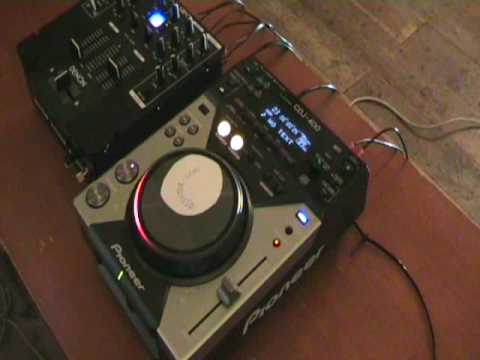
In a sense, what we've got now is all of a sudden you, you will have two music sources coming out of your mixer. So you will be able to turn me up or down and still watch me, you lucky person. I wish, well not me actually, I think my wife wishes she could turn me up and down sometimes. More than likely she'd probably turn me down and throw away the knob. I just thought about that. Oh god. Right, okay, what am I going to do? Oh dear, shut up. Right, calm down. So it is, so I've got to be careful here. Right, alright, very quickly as well, the track I'm playing is from Mr Danny J Lewis, Enzyme Black, and as ever, don't look down there and say, what is it? Follow the link in the description, I'll give you the title, the name, all that sort of stuff, which will take you to Mr Danny J Lewis's website, that direction. Let's have a look at the kit, here we go. Right, what have we got? We've got there, it's the Pioneer CDJ-400, and over there we've got a Denon DNX.
4:35 Of this tutorial, tutorial number two
Now, what are we going to do in tutorial number two? Right, and again, this is very straightforward. I'm going to play a track here. Now, first of all, what I want you to do, I want you to beatmatch the track you're going to use in conjunction with this one. So, in other words, okay, give yourself a bit of time and again, you can pause this video anytime you want to. So, I'm going to, on the second count of one, press play. When I press play, I want you to start your track and I want you to get it beatmatched as well as you can. Now think about it, you could maybe spend two minutes beatmatching it, ten seconds. If it takes you a long time, you could take six months because you can watch this video as many times as you want. So the first part of this tutorial, tutorial number two, is for you to get your track beatmatched with this one.
The plug from your PC into your mixer. In other words, you would do something like that. So this would be me up and down here, and this one here would be that one there. And again, what I'm trying to do, I'm trying to read, think between the lines. In other words, I'm trying to think how you're thinking, watching, learning and listening at the same time what I'm doing. So in other words, this one here is you, this one is me. Alternatively, if you've just got your PC speakers, then you'd have the volume down and you'd have the volume up. On your one music source. So what I'm going to do, I am going to count 1, 2, 3, 4, 1. On the second time I count number 1, I'm going to hit play. I'll just give you a demonstration. 1, 2, 3, 4, 1. OK, so the first part of this second tutorial is you matching the beats in time with this track. Now notice I've set the pitch in the centre position.
7:36 On the second count of 1, I'm going to hit play
I will let this track play for quite a while, enabling you to beatmatch it. But like I said earlier, you can rewind, rewind until you've got it beatmatched. So this is part number one. Here we go. Ready? One, two, three, four, one. Got your track beatmatched. So in other words, your track will be at exactly the same BPM, beats per minute, to this one here. Right, the second part... We're going to get a little bit more intricate. Now this is where you are even more involved. What I'm going to do, I'm going to do exactly the same as I did about two minutes or one minute ago. I'm going to do 1, 2, 3, 4, 1. On the second count of 1, I'm going to hit play. You're going to do exactly the same thing, hit play. But here's the difference. I'm going to let this play at the precise speed your track will be going because you got it beatmatched earlier.
9:00 One, two, three, four, one
The only difference being is I'm going to reduce the speed on my pitch control very slowly and very slightly. What you need to do is you need to do exactly the same thing, have your fingers on the pitch control and move the pitch in conjunction with me. Now maybe your movements could be faster or slower but the emphasis with this particular demonstration This interactive tutorial is that you will keep your beat, the beats of your music in time with the beats of this track. Think about it. This could be very good practice for you. So as follows, I will hit play on the count of one the second time I get number one. I will count a bar, 1, 2, 3, 4 and then I'll say number one again. When I say number one for the second time, you, like me, will press play. Are you ready? I hope so. Here we go. One, two, three, four, one. Get ready. People are asking me, why don't you do a DVD and sell it? Well, I don't want to do... well, I don't want to sell what I'm doing. I would like to do this for free. Full stop. Period. So...
To be quite honest, the way I look at it is if I can sort of try and get inside your room and give you your own personal tutorial, then all the better. Hopefully this will help you. Now bearing in mind this is only video number two and the way my mind works, sometimes it explodes. It's really crazy. I don't know what goes on inside there. No one does. Do I? Anyway, so hopefully... Yeah, sorry. Hopefully what I'll be able to do is I'll be able to do similar things on drum and bass, on techno, on trance, etc., etc. Hip-hop, soul, R&B, funk, let's just go wacky and wild. Now if you do like this particular tutorial and you maybe video you doing the tutorial or working at it while you're watching me...
Then post it as a video response underneath here as well. So thank you very much and a big shout to Mr Danny J Lewis. Do you know why I love your music? Because it's full of soul, it's got a bit of gospel, it's uplifting and it makes me want to party. Thank you. Practice and enjoy.
This transcript was produced automatically from the audio of the video and may contain mistakes.








