 13:10
Vinyl CDJ Controller Master Tempo Key Lock Pitch % What Do They Do and How Do They Change a DJ Mix?
Contents of the video
0:00 Excuse me a second, just got to send a text
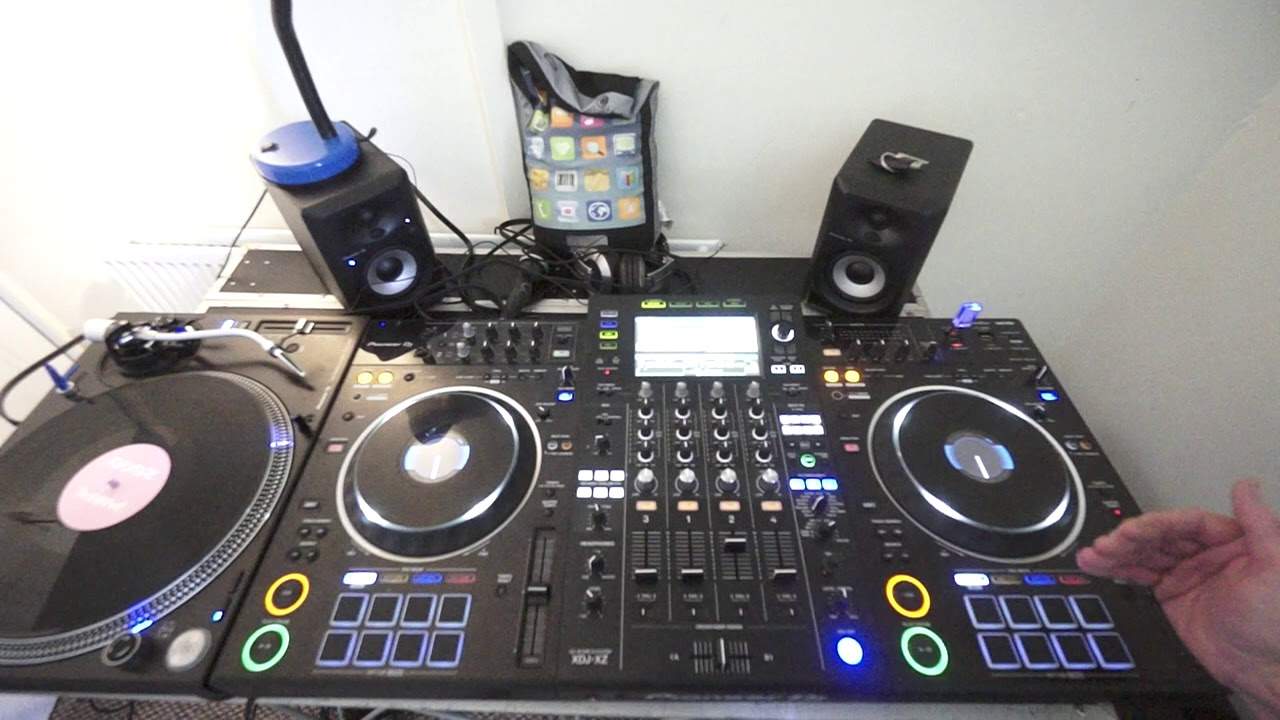
Right ladies and gentlemen, I do get quite a few emails on variations on pitch, master tempo, vinyl, controller, CDJ, how it works and the differences between using them all. Excuse me a second, just got to send a text. Oh sorry, wrong one. Okay. Anyway, so what I'm going to do in this video, by the way, the tune I'm using is Lenny Fontana. New York. That is going to be used on the deck. This is the XDJ-XZ. I'm going to be using a tune on vinyl as well, but I'm not going to be playing too much of that due to copyright reasons. So really this isn't about listening to the tracks. This is more about really what is going on. So what we're going to look at in this video is the variation between using, not using master tempo.
Also using the variation of the plus and minus 6%, 10%, we also have 16% and the wide feature as well. What's that all about? The difference between using the controller here with master tempo on and off, and of course then comparing that to vinyl. Here I have the Pioneer DJ PLX1000 where you don't have the master tempo. So there's a heck of a difference. You see you may find that you've got two tracks that, you know, they sound great together but they're different BPM. But then if you're using vinyl as soon as you match the BPM they now may sound out of key. So they may be in beat but now they're out of key. So first of all let's have a listen to... so what I'm going to do on the right hand deck I'm gonna have master tempo on
On the left hand deck, master tempo off. And then of course show you what it's like if we use vinyl and how you can't set master tempo. But you actually can if you're using virtual vinyl with a program, but I'm not using that. This is real vinyl. By the way, don't forget as well, at the end of the video I will give you more info. On how I can teach you one-to-one, because I do give online personal private lessons one-to-one through a video call. Anyway, so on the right hand side, let's have a listen. Okay, so at the moment now we're on plus or minus 6%. I'm just going to put it forward a bit. Master tempo engaged. Slow it down. Speed it up. 10%. Slow it down. Now wide. Just go forward to the beat.
3:21 Drive the car then hopefully eventually
Okay, so I want to talk you through everything what was going on there. You know the analogy here it's a little bit like stepping into a car and so for the first time and someone saying off you go and drive it you got no idea but if they explain how to drive the car then hopefully eventually you can learn and be able to drive okay so first of all So master tempo engaged, that means that it will keep the key of the track. The sound, the music will stay the same which is really important. Then what I did, I had it set plus or minus 6%. So the 6% basically is it will increase towards you, decrease 6% of the original BPM of the track. So if it's 100 BPM, it's a hip hop tune, 100 BPM. Bring it towards you, it'll go to 106 BPM. Slow it down, it'll go to 94 BPM. Same applies with plus and minus 10%. It's just 10% of the overall speed. 16 and wide is great because it will actually stop the track if you put the speed, the pitch all the way away from you.
5:21 Slower track, hip-hop tune, faster track
You're going to slow it down by 100%, which means you're going to stop it. That's why we get that really nice kind of slow-down sound. It's almost as though you're dragging something very slowly along the ground. So, let's get a wide listen. Now, why would you use a feature like that? Well, let's imagine you are playing a house tune and you want to mix in a hip-hop track. way to do it but here's a big tip now a very very big tip and trust me you need to do this if you don't do it this way you're going to fail dismally let's say you have a hip-hop tune on the left hand side you have a house a faster track on the right hand side and you want to mix the faster track into the slower track you would set this track
To the wide feature you would then make note of the speed of the slower track now the trouble is when you slow down the wide feature it's very difficult to get it exactly the same speed as the one on the left so let me explain let's say this one's 120 bpm and the one on the left is say for example 100 What you may find is that as you slow this one down, it will slow 120, 19, 18, 17, 16 very quickly. And then you may find it will get to say 100.9, 108 or 100.7 or 101. It's very difficult to get that exactly the same speed as the other one. So what I recommend is you slow this one down to as close as you can get. The hip-hop tune and then the hip-hop track this side at plus and minus six percent, it's easier to then get this one to the speed of the one you've slowed down. Now you've got to be slightly quick in it. I will do a demonstration on this in the future but again this is sort of a tutorial in a demonstration. It's a way of going from a fast track to a slow track but if you're going to do that
7:53 The sound drops even more again, and rises even more
Always make sure you've got the master tempo engaged. Now, if I do the same thing now with no master tempo, let's have a listen. So, no, in fact, actually, let's leave that master tempo on. Let's do that on this side. So at the moment now, I'm on 6%. Let's do the same thing here. So we can hear the sound dropping and rising as well. So at 10%, the sound drops even more. The sound rises even more. At 16... The sound drops even more again, and rises even more. And then, the wide feature, it drops dramatically. Increases dramatically. Okay, so let's go to vinyl. Now again, I don't want to use too much for copyright issues. At the moment now, let's go to plus and minus 8%. So if we go there, we can hear a heck of a difference already.
With vinyl, we can hear as I speed it up the sound rising as well as the speed increasing and when I slow it down the sound is dipping as well as the speed is slowing down. So let's go all the way now to 50% and we should hear a dramatic difference now. So I'm just going to put the needle back again a little bit. Here we go. Slow it down. Speed it up. So basically with real vinyl, when you are increasing and decreasing the speed, you have... When I say that, I'll start again. When you're increasing and decreasing the speed dramatically, you have absolute no control or you do have control over the key of the track, but then you have to be more musically minded if you want to mix. That track that you're speeding up quite dramatically or slowing down with another track that maybe you're trying to catch up the beat of the speed with. Now, there is sort of a way around this. Now let's think quite logically here. If you're using vinyl and you're using a controller or some form of unit which will let you engage master tempo...
10:15 I hope that makes sense there
Think pure logic. Let's say the vinyl is very fast, but the track that you're trying to mix in is very slow on your controller. With master tempo engaged and the wide feature engaged, you can indeed increase the speed or slow it down to match the speed of the vinyl. You can't really do it the other way round because if you've got the vinyl playing then you have to slow it down dramatically or speed it up. You're not only going to slow it down but you're going to dip the key, you're not only going to speed it up but you're going to increase the key. So I hope that makes sense there. It's a little bit of sort of like trying to get your head around it but once you start playing around with it you'll realise it's just sort of common sense. Sorry, text. There we go.
And also again, you know, with virtual vinyl, you don't have this problem because once you use virtual vinyl, you will have an icon on your laptop which is similar master tempo, also sometimes known as key lock, which is locking in the key and then that will let you mix practically any style you want so long as you have key lock set. So there you go. Now again, with the lessons, I still give... Online lessons. Now these are personal, private lessons by myself, Jonathan Ellaskins, The DJ Tutor. There is an email in the description of this video. Send me an email, explain who you are, where you're from and so on and hopefully we can hook up. The lessons are £20 an hour. If you book five lessons in one go it's £90. The fee is paid to PayPal. I teach from 9am in the morning GMT UK time.
Till 7 in the evening, that's most days. I go through Gmail, video call, maybe Skype. We can also do Facebook Messenger. But what I have to say here... Each session is completely and strictly confidential. I don't share any information, no emails or anything that sort of crap is passed on. It's basically me and you getting on. We can go on vinyl, we can go on controllers, we can go on CD players and it's basically teaching you anything and everything you want to know. About hip-hop, R&B, soul, disco, jazz, funk, house, techno, electro, drum and bass, all kinds of genres of music, old and new. So email is in the description. Let's hook up sometime. Thank you for watching. Don't forget, please share, give me a thumbs up, practice and enjoy. Thank you.
This transcript was produced automatically from the audio of the video and may contain mistakes.








