 10:24
Whats the Jog Wheel for on a CDJ Turntable and Controller
Contents of the video
0:01 As well will be exactly
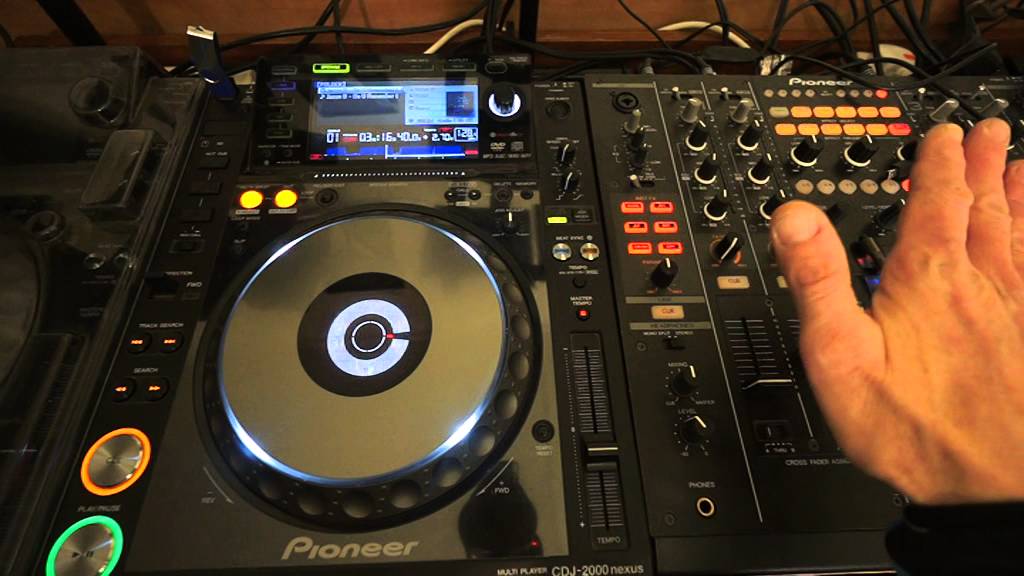
Alright guys, this is a demonstration, more so it's a tutorial and an explanation on the jog wheel. In front of you we have a CD player. What I'm about to explain as well will be exactly the same for a controller and a vinyl turntable. There are slight differences which I will explain. I'm going to give you a demonstration first, then of course there'll be an explanation. The track I'm using by the way is by Karmic Power Records. It's a track by Jason B. It's a track entitled Do You Remember and I'll put information and a link to Karmic Power Records and also to Lenny Fontana Facebook page in the description. Press play. Now at the moment this track is at 0-0-0. The pitch is at the exact centre point which means that the speed of this track...
Is exactly how it was when it was made in the studio. So what I'm going to do as well is I've set this player to CDJ mode which means now wherever I touch the platter, whatever I do with it, if I touch it, if I turn it backwards or forwards, I will not be able to stop the track. This is the important bit. Okay, what I'm going to do now, I'm going to now move the jog wheel in an anti-clockwise direction. Anti-clockwise motion. Slowly to begin with, then fast. Now I'm going to move it fast. Let's start the track again. Fast and slow. Anti-clockwise. I'm now going to do the opposite. I'm going to move the jog wheel clockwise, slow and then fast. Slow, now fast. I'm now going to stop. What I'm going to do now, stop, I'm going to go into vinyl mode, do exactly the same, touching the top of...
2:52 Sorry, that was clockwise
The CD player. Now this will apply to a lot of controllers, not every controller. This will also apply to the likes of a vinyl turntable if you use the vinyl turn... Yeah, this is family life. If you use the vinyl turntable correctly. So I'm going to touch the top and it stops. What I'm going to do now is move the side of the CD player anti-clockwise but slowly. Sorry, that was clockwise. I beg your pardon. Anti-clockwise first. Sorry. Slowly, now fast. Just move the track a little bit forward. OK, now clockwise and faster. OK, so of course what's happening here is when I am moving the jog wheel anti-clockwise slowly... I'm reducing the speed. The BPM beats per second. Per minute of the track. But I'm reducing it only a tiny amount.
So for example, this track is at 125. By moving the jog wheel slowly... I could be reducing the speed let's say to 122, 123. The faster I move the jog wheel, the slower it will go. The faster I move it anti-clockwise, the slower it will go. If I then start to move the jog wheel slowly clockwise... It will go from 125 possibly to 127. But again, the faster I move the jog wheel clockwise... The faster the BPM will go. So it could go from 125, 127 to maybe even 130 or faster. But this is the key. Because I have not moved the pitch... As soon as I stop touching the jog wheel or stop moving the jog wheel clockwise... Or anti-clockwise... What will happen is the track will go back to its original speed. So, the original speed on this track is 125.
So as soon as I stop moving the jog wheel it will go back to 125. Now I'm going to increase the speed now to 128.4. This is a very simple example. Go back to CDJ mode. Move the jog wheel clockwise slowly.
4:59 The increase in speed
The increase in speed. We can tell, we can hear it. Speed up even more. I'm going quite fast now on the jog wheel. Stop at its original speed where the pitch was. Okay, this video is really relating to a question that someone asked me... About why is it that DJs can get these really, really smooth transitions for one or two minutes at a time... Without having to move the jog wheel. Well, it could be a case of they've set sync... Into... They've used... Sorry, I beg your pardon. They've used the sync function on the CD player or their controller. Alternatively it could be because they have fine-tuned that turntable that they're mixing on... Excuse me. To be at exactly the same BPM and time as the other turntable.
Now why does a DJ use the jog? Why do they nudge the track? Now let's say for example... The CD player or the track... A track that's playing that we can't see on the other CD player over there is at 128.4. And this one in front of us, let's say if I just move this very slightly forward is at 128.5. Now this track here, the CD player directly in front of us is 0.1 BPM faster. So what that will mean is... In a small amount of time, this CD player will start to go faster. So what the DJ needs to do is to move the jog wheel anti-clockwise to slow this track down very slightly. Now the DJ can carry on if they want to moving the jog wheel very slowly anti-clockwise... For this track to slow down very slightly as you heard earlier on in this demonstration...
7:32 Decrease the BPM of the track
Get back and I use that term to get back in beat with the other track. Now if the DJ wants they can carry on doing this... Alternatively, the best point, the best thing for the DJ to do is to reduce the speed on the pitch. Because by reducing the speed on the pitch you will then decrease the speed of the track. Decrease the BPM of the track. And there will be no need to continue moving the jog wheel anti-clockwise. Now let's say we have the opposite. Let's say the track that we can't see, the CD player we can't see is 128.4. I'm now going to reduce this to 128.3. Now what's happening is the opposite. This track now will start to slowly get out of beat... But this track will be slower. The BPM beats per minute will be slower than the other track.
So what the DJ will have to do now is nudge this forward... Start moving the jog wheel clockwise very small amounts... To keep this track in beat. And the DJ can carry on doing this for as long as they want. And they will have to carry on doing this because this track here... Is 0.1 BPM slower than the other track. So of course the only way of not having to move the jog wheel... Is to increase the speed, move the pitch towards you... To increase it to the same speed as the other one which is 128.4. Now some people at this point may be saying yes but... I've been in a situation where I have seen that one track is at 128.4... And the other one is at 128.4 yet they still go out of beat. Now that could be down to a lot of things...
It could be the software, it could be that the firmware hasn't been updated... It could be that the player you've got isn't as precise as the readout says. It could be a fluctuation in the power supply coming in... It could be a fluctuation even in the BPM of the track. So nothing is infallible. There could be some slight problem with the track itself, the player. What you do have to do is of course use your ears. So the pitch is there to increase or decrease the speed... Depending on where you put the pitch will be dependent on how fast or slow you want the track to go. The jog wheel is there for what we class as the DJ term as nudging the track. Nudging. Nudging the BPM forward clockwise or nudging anti-clockwise to reduce the BPM.
Now I hope that's been a help. If you do want any more info don't hesitate leave a comment in the description... And I'll finish off with practice and enjoy. Thank you very much.
This transcript was produced automatically from the audio of the video and may contain mistakes.








